Offload Mac storage to a drive, cloud folder or bucket
The finished film project, last year's photo exports, a model you'll need again in spring. None of it is junk, and none of it has to live on your internal SSD.
Short answer: offloading moves a file or folder from your Mac's internal disk to storage you own, such as an external drive, a cloud folder or an S3 bucket, and remembers where it went. Clearbay copies the item, checks the copy, frees the space only once that check passes, and lists every offloaded item in Harbor with a Restore button.
- Free download
- macOS 14 or later
- Apple silicon & Intel
Offload, delete or back up: which one you need
All three show up in advice about a full Mac, and they solve different problems. Mixing them up is how people lose files, so here's the difference in one table.
| Option | Frees space on the Mac | Where the file ends up | Good for |
|---|---|---|---|
| Remove | After the Trash is emptied | Gone | Installers, caches, true duplicates |
| Offload | Yes, right after the copy is verified | One copy, on your drive, cloud folder or bucket | Finished projects, archives, media, models |
| Back up | No | Still on the Mac, plus a copy elsewhere | Protecting files you keep on the Mac |
The catch: an offloaded item exists once, on the destination. If that copy matters, include the drive or bucket in your backup routine too. Our step-by-step guide to offloading files to an external drive covers drive formats and why offloading is not a backup.
Where Clearbay can offload to
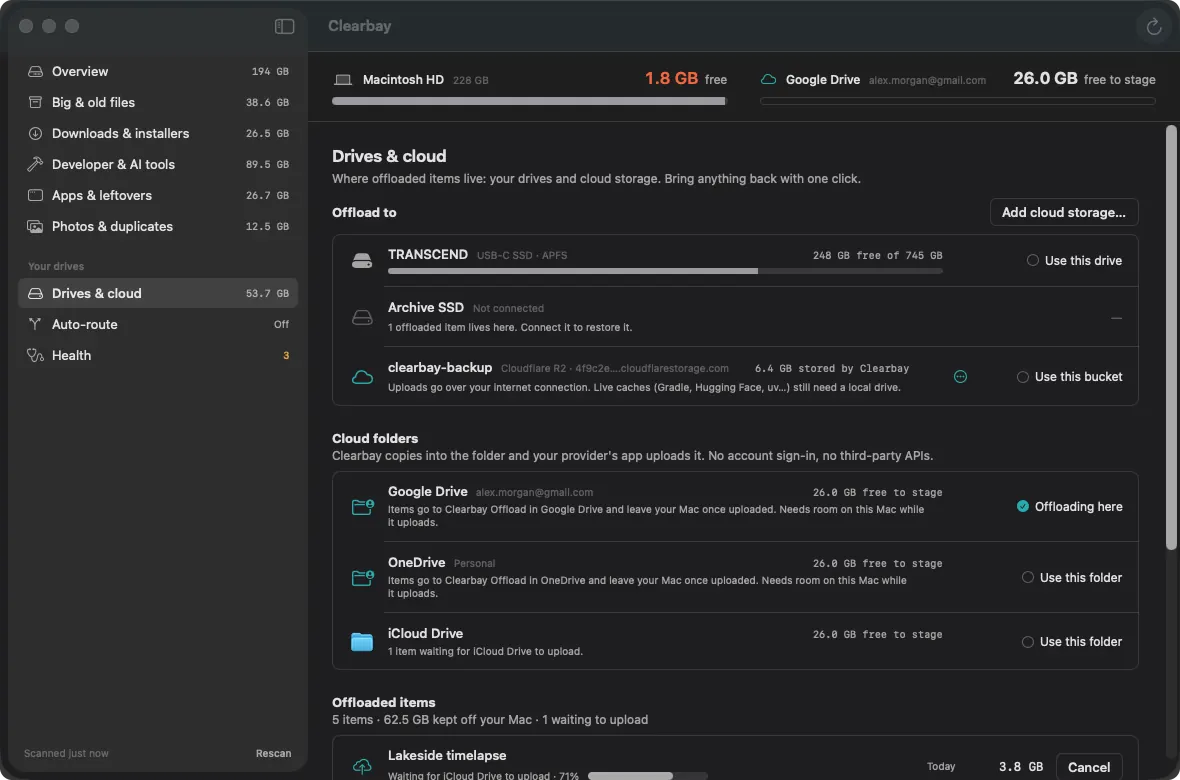
Harbor is the screen that keeps your destinations and your offloaded items together. You can mix all three kinds and pick one as the current target.
| Destination | Works with | How the copy is checked | Worth knowing |
|---|---|---|---|
| External drive | Any external SSD, hard disk or USB stick your Mac mounts | File count and total bytes on the drive | Fastest restore; the only place rewired developer caches can go |
| Cloud folder | iCloud Drive, Google Drive, OneDrive, Dropbox, Box | Copy verified, then Clearbay waits until the provider's app reports it uploaded | No sign-in and no third-party API: it uses the folder the provider's app already syncs |
| S3 bucket | Amazon S3, Cloudflare R2, Backblaze B2, Wasabi, MEGA S4, MinIO or another S3-compatible endpoint | Uploaded size, metadata and a SHA-256 checksum in the item's manifest | Streamed straight to the bucket with no temporary archive on your Mac; keys stay in this Mac's Keychain |
Cloud folders are found for you if the provider's app is installed. Setting up a bucket, picking a provider's region or tuning its cost settings is covered in the setup guides linked under Related.
How it works
- Pick a destinationPlug in a drive, choose a cloud folder, or add a bucket and press Test connection.
- Mark items as OffloadFrom any list of the scan, or straight from the Space Atlas map. The rest stays on Keep unless you change it.
- Review the planBefore anything moves you see how much will leave the Mac and how much room the destination has left.
- Copy, then verifyClearbay copies with extended attributes and permissions intact, then checks the result on the destination. A failure at any point leaves the original untouched.
- Free the spaceOnly after the check passes is the original deleted from the Mac. It skips the Trash on purpose: a trashed original would still use the space you're trying to free.
- Keep the recordA manifest notes what moved, from where and to which destination, and the run lands in the Logbook.
Why cloud folders take a little longer
Dropping a file into Google Drive or OneDrive doesn't mean it's in the cloud yet. The provider's app uploads it in the background, and until then your Mac holds the only copy. So Clearbay doesn't delete the original as soon as the copy lands in the folder. It waits until the provider's app reports the upload as finished, then removes the original and asks macOS to drop the local copy, so the file stays online-only. If the provider won't let it, Clearbay tells you how to free that copy yourself.
- Items still uploading are marked as waiting and carry on the next time Clearbay opens.
- If a provider doesn't report upload status, Clearbay keeps your original until you confirm.
- Staging needs room for the item plus 2 GB on the Mac, because the copy sits locally until it's uploaded.
Provider quirks, like Google Drive's stream and mirror modes or iCloud's own optimisation, are covered in the per-provider guides, starting with offloading files to iCloud Drive.
Harbor: every offloaded item, one Restore button away
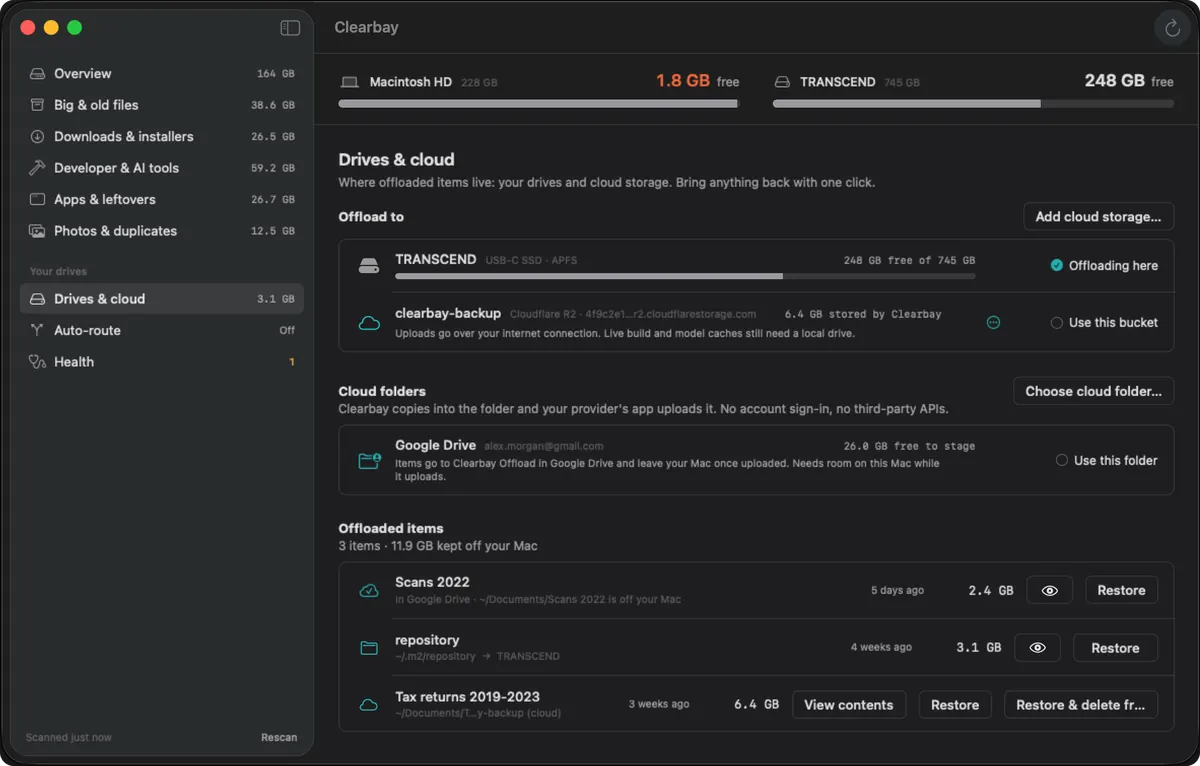
Every offloaded item sits in Harbor with its size, date and destination. Restore copies it back to its original path. For bucket items, View contents shows the archive's file list with no download, and restoring keeps the cloud copy unless you choose Restore & delete from cloud.
Restore never overwrites. If something new now sits at the original path, for example a cache the tool rebuilt, Clearbay renames that copy aside with a dated suffix rather than deleting it.
When the drive isn't plugged in
Clearbay keeps each item's manifest on your Mac, so a disconnected drive still appears in Harbor, marked as not connected, with the items stored on it. Plug it back in and Restore works again. Nothing is forgotten because a cable was out.
Auto-Dock: offload new files as they arrive
Offloading clears what's already there. Auto-Dock stops the next pile from forming: fresh AirDrop transfers, browser downloads, screenshots and recordings land on your drive whenever it's plugged in. When it isn't, they wait on the Mac and move once the drive is back. Your Downloads folder stays a real folder, so AirDrop and browsers behave normally.
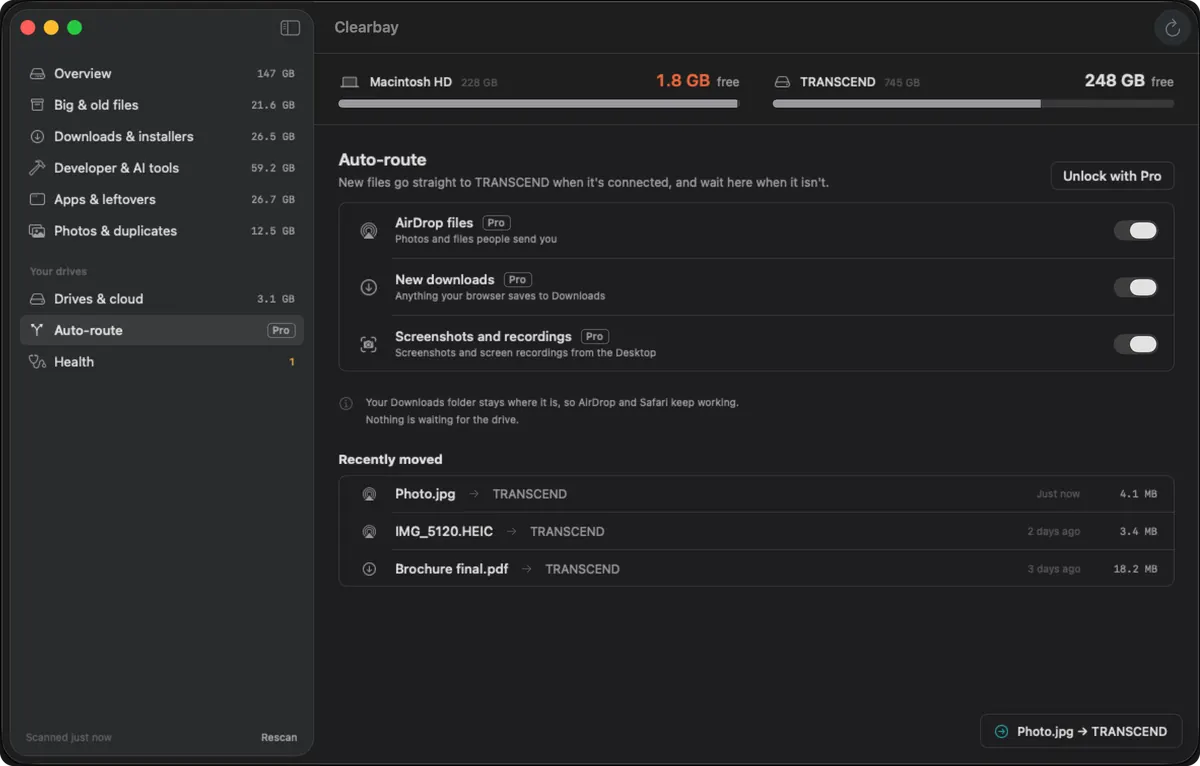
Setting it up for your downloads, with the reasons it never replaces the folder with a link, is explained in automatically moving downloads to an external drive.
Logbook and Undo
Every run is written to a journal on your Mac. Undo last run reverses the most recent plan in one click: offloaded items come back from their destination and trashed items come back from the Trash. The Logbook keeps the full history, so months later you can still see what went where.
Free and Pro for offloading
| Feature | Free | Pro |
|---|---|---|
| Offload to an external drive | One folder, up to 5 GB | Unlimited |
| Cloud folders | No | Yes |
| S3 buckets | Add and test a bucket | Yes |
| Auto-Dock | No | Yes |
| Restore, Undo last run and Logbook | Yes | Yes |
Restoring is always free, so items you offload never get locked behind a purchase.
Offloading questions
How do I offload Mac storage to iCloud?
In Clearbay, choose iCloud Drive as the destination in Harbor, mark the items you want to move as Offload and run the plan. Clearbay copies them into a Clearbay Offload folder in iCloud Drive, waits until iCloud has uploaded them, and then frees the space on your Mac. You need room in your iCloud plan for the items.
Does moving files to an external drive free up space on a Mac?
Only if the originals leave the internal disk. Dragging in Finder copies them, so you'd still need to delete the originals and empty the Trash. Clearbay's Offload does the copy, the check and the removal in one step, and keeps a record for restoring.
Is offloading the same as backing up?
No. Backing up adds a copy while the original stays on your Mac. Offloading moves the item, so the destination holds the only copy. Back up the drive or use a bucket with its own redundancy if the files matter.
Can I offload files to Google Drive or OneDrive so they don't stay on my Mac?
Yes, with Clearbay Pro. The provider's app must be installed and signed in. Once the upload is confirmed, Clearbay removes the original and asks macOS to drop the downloaded copy, so the files stay available online-only.
Are my S3 access keys stored safely?
Clearbay saves them in your Keychain, limited to this Mac, and sends them nowhere except the endpoint you entered. Use a key limited to the one bucket you offload to.
Can I offload developer caches to the cloud?
Not caches that a tool keeps using, such as Gradle or Hugging Face: those need a local drive so builds and downloads keep working. Read how Clearbay rewires developer tools after offloading.
Move it off your Mac, not out of your life
Try offloading for free with one folder up to 5 GB. Pro unlocks unlimited offloading to drives, cloud folders and buckets, plus Auto-Dock, for a single payment.
Related
Clearbay is made by Bisai Technologies, LLC · Mac storage guides · Changelog · Support · Privacy · Terms · Refunds