Set Up Cloudflare R2 for Clearbay: Token, Costs, Limits
Create a private R2 bucket and a bucket-scoped token for Clearbay, check the multipart cleanup rule, and choose between R2 Standard and Infrequent Access.
 By Clearbay TeamGuides from the people building Clearbay

To set up Cloudflare R2 for Clearbay, create a private R2 bucket, make an Account API token with Object Read & Write limited to that bucket, and copy your 32-character Account ID. Then paste the Account ID, bucket name and the token's two keys into Harbor → Add cloud storage… → Cloudflare R2 and click Test connection. R2 charges nothing for downloads, so bringing files back to your Mac costs only the storage you already paid for. This guide shows each step, then the numbers: when R2's Infrequent Access class is worth it (above about 234 GB), and exactly how many R2 operations Clearbay uses.
Prices are from Cloudflare's R2 pricing page as checked on 2026-11-14.
Why Cloudflare R2 suits Mac offloads
- No egress fees. Restoring 1 TB costs $0 in transfer. On Amazon S3 the same restore is about $81 from US East.
- A real free tier. Every month, the first 10 GB of Standard storage, 1 million Class A operations and 10 million Class B operations are free.
- No regions to pick. The bucket location is automatic and your endpoint is the same for every bucket in your account.
The trade-offs: enabling R2 usually means adding a payment method to your Cloudflare account, even if you stay inside the free tier, and Standard storage costs $0.015 per GB-month, roughly twice Backblaze B2. If you'll store a lot and restore rarely, compare with our Backblaze B2 guide. If you'd rather avoid a monthly bill entirely, offload to an external drive instead.
Step 1: Set up Cloudflare R2 with a private bucket
- Sign in to the Cloudflare dashboard and open R2 object storage. The first time, Cloudflare may ask you to add a payment method before R2 is enabled.
- Click Create bucket. Name it with lowercase letters, digits and hyphens, 3–63 characters, for example
clearbay-jane-mbp. - Location: leave it on Automatic, or give a location hint near you. Don't choose a jurisdiction such as EU unless you need data residency; see the note below.
- Default storage class: choose Standard unless you'll keep more than about 234 GB for a year or longer. Clearbay doesn't send a storage class, so every upload uses the bucket's default. The cost section explains the break-even.
- Click Create bucket. Leave public access and custom domains off. Clearbay only uses the private S3 API.
EU or other jurisdiction buckets: these use their own endpoint, such as https://<ACCOUNT_ID>.eu.r2.cloudflarestorage.com. Clearbay's R2 preset builds the standard endpoint, so for a jurisdiction bucket choose Custom as the provider instead, paste that endpoint, set the region to auto and keep Path-style URLs on.
Step 2: Create a bucket-scoped R2 API token
- On the R2 overview page, find Account Details and click Manage next to API Tokens.
- Click Create Account API token. An Account token belongs to the Cloudflare account. A User token stops working if that user is ever removed from the account, which would quietly break your offloads.
- Name it after the Mac, for example
Clearbay – Jane's MacBook Pro. - Under Permissions, choose Object Read & Write.
- Under the bucket scope, choose Apply to specific buckets only and select the bucket from Step 1.
- Optionally set a TTL. When it expires, Clearbay's uploads and restores will fail until you paste a new key.
- Click Create. Copy the Access Key ID and Secret Access Key now. Cloudflare shows the secret only once. (Technically, the Access Key ID is the token's ID and the secret is a SHA-256 hash of the token value, which is why it can't be shown again.)
Which permission does Clearbay need? We checked every request its S3 client sends against R2's four permission levels:
| R2 permission | What it allows | Works with Clearbay? |
|---|---|---|
| Object Read & Write (one bucket) | Read, write and list objects in the chosen buckets | Yes, the right choice |
| Object Read only | Read and list objects | No. Test connection fails because Clearbay must write and delete a probe file. |
| Admin Read & Write | Also creates, lists, configures and deletes buckets | Works, but grants far more than needed |
| Admin Read only | Lists buckets and reads configuration and objects | No, can't write |
R2 tokens are scoped by bucket, not by folder. Clearbay writes only under clearbay/<this-Mac's-id>/, but the token itself can reach the whole bucket. That's the main reason to give Clearbay a bucket of its own rather than sharing one with a website or another app.
Step 3: Find your Account ID
The Account ID appears on the R2 overview page under Account Details. It's 32 characters of digits and the letters a–f. The S3 endpoint shown nearby is https://<ACCOUNT_ID>.r2.cloudflarestorage.com. If you paste that whole endpoint into Clearbay's Account ID field, Clearbay strips it down to the ID for you.
Step 4: Connect Cloudflare R2 in Clearbay
- In Clearbay, open Harbor and click Add cloud storage….
- Pick Cloudflare R2 and fill in the fields below.
- Click Test connection. Clearbay writes a small probe file under
clearbay/, reads its size back and deletes it. When you see "Connected. Clearbay can write, read and delete in this bucket.", click Save. - To send cloud offloads here by default, tick Offload here from now on.
| Clearbay field | What to paste |
|---|---|
| Account ID | The 32-character Account ID (or the full endpoint URL) |
| Bucket | The bucket name; capitals are lowercased automatically |
| Access key ID | The token's Access Key ID |
| Secret access key | The token's Secret Access Key, saved only in this Mac's Keychain |
You don't type a region. Clearbay signs R2 requests for the region auto and uses path-style addresses (endpoint/bucket/key), which is what R2 expects. Adding a bucket and testing it is free; offloading to cloud storage is part of Clearbay Pro.
Step 5: Check the multipart cleanup rule
Large items go up as multipart uploads. If your Mac crashes or loses power mid-upload, Clearbay can't resume yet, and the parts already sent would sit in the bucket. Cloudflare's lifecycle documentation says buckets have a default rule that expires multipart uploads seven days after they start. To check it, open the bucket → Settings → Object lifecycle rules.
Seven days is a safe value: even a 200 GB item, Clearbay's per-item maximum, takes about 22 hours at a 20 Mbit/s upload speed (200 GB × 8 ÷ 20 Mbit/s), so the rule never touches a live upload. If you want leftovers gone sooner, click Add rule, limit it to the prefix clearbay/, and choose to abort incomplete multipart uploads after 3 days. Don't go lower on a slow connection.
If you manage buckets with S3 tools, the same rule in the S3 lifecycle format (R2 supports PutBucketLifecycleConfiguration) looks like this. Apply it with an Admin token, not Clearbay's Object token, because changing bucket settings needs admin rights:
{
  "Rules": [
    {
      "ID": "Abort Incomplete Multipart Uploads",
      "Status": "Enabled",
      "Filter": { "Prefix": "clearbay/" },
      "AbortIncompleteMultipartUpload": { "DaysAfterInitiation": 3 }
    }
  ]
}
Cloudflare R2 pricing for Mac archives: Standard vs Infrequent Access
R2 has two storage classes. Both are read with a normal GET request, so Clearbay restores from either the same way.
| Standard | Infrequent Access | |
|---|---|---|
| Storage | $0.015 per GB-month | $0.01 per GB-month |
| Class A operations (writes, lists) | $4.50 per million | $9.00 per million |
| Class B operations (reads) | $0.36 per million | $0.90 per million |
| Data retrieval | free | $0.01 per GB |
| Egress to the internet | free | free |
| Minimum storage duration | none | 30 days |
| Free tier | 10 GB-month, 1M Class A, 10M Class B | none |
Infrequent Access looks cheaper per GB, but two details push the other way for a small archive. First, the free tier only applies to Standard. Second, R2 rounds usage up to the next billing unit, and operations are billed per million. Cloudflare's own example: 1,000,001 operations are billed as 2 million. So the roughly 6,000 Class A operations Clearbay needs to upload 100 GB cost a full $9.00 in Infrequent Access, while they're free in Standard.
We modeled a typical year: you upload Mac files as 10 GB items, keep them 12 months, and restore everything once.
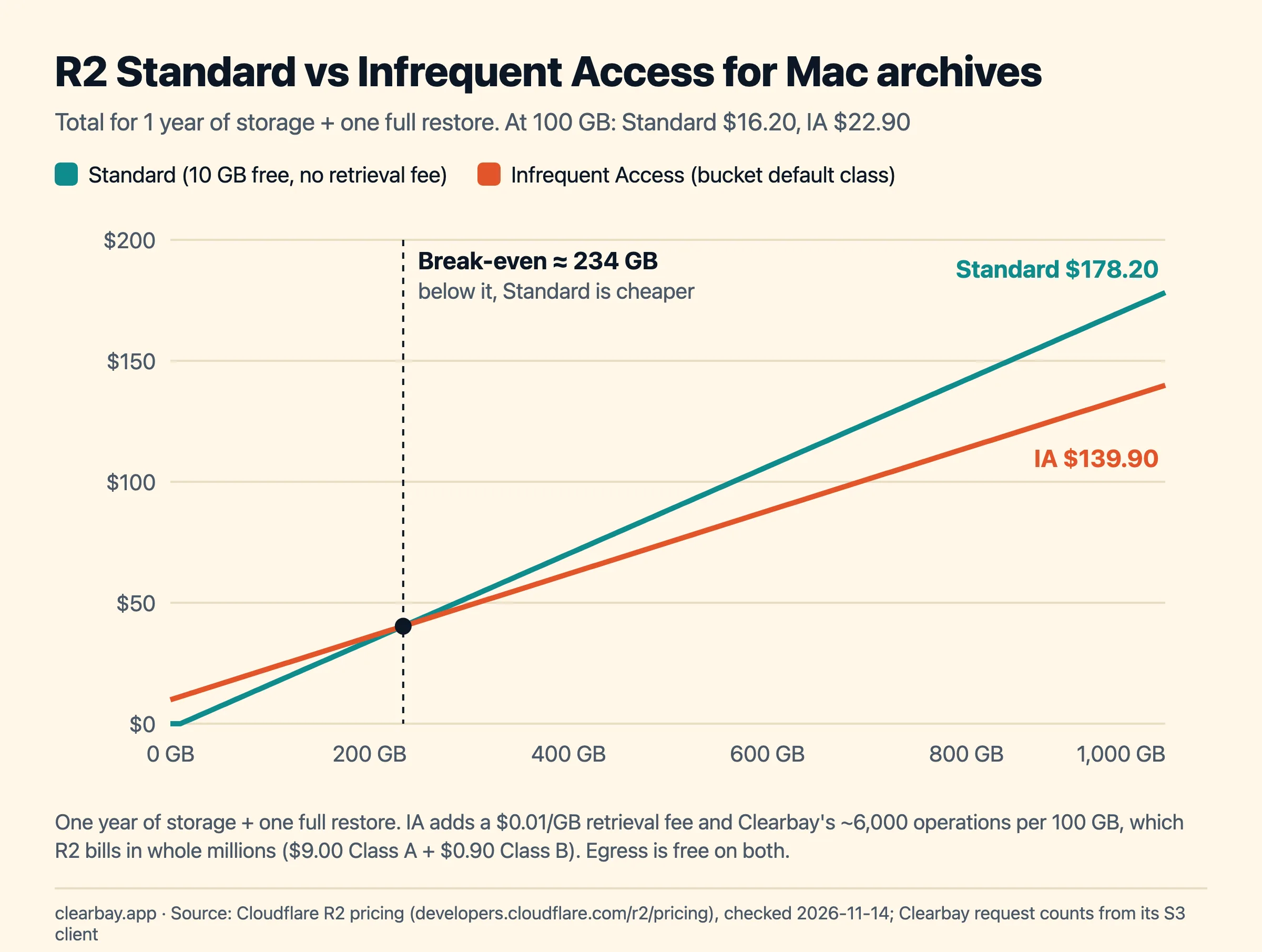
| Scenario | Standard | Infrequent Access (bucket default) |
|---|---|---|
| 100 GB for 1 year, restored once | $16.20 (90 billable GB × $0.015 × 12) | $22.90 ($12 storage + $9.00 Class A + $0.90 Class B + $1 retrieval) |
| 1 TB for 1 year, restored once | $178.20 (990 GB × $0.015 × 12) | $139.90 ($120 + $9.00 + $0.90 + $10) |
Setting the two totals equal gives the break-even: 0.18 × (GB − 10) = 0.13 × GB + 9.90, so about 234 GB. Below that, keep the bucket on Standard. Above it, and if your items will stay at least 30 days, Infrequent Access saves money. Deleting or restoring-and-deleting an IA object before 30 days still bills the full 30 days.
A lifecycle rule can also move objects from Standard to Infrequent Access after a number of days. Each move is billed as a Class A operation, and objects can't move back to Standard. For most people, picking the right default class when you create the bucket is simpler.
How many R2 operations Clearbay uses
We traced the requests in Clearbay's S3 client for one 10 GB item. Clearbay streams the item as a single tar archive in 16 MiB parts (597 parts for 10 GB), three at a time, with no temporary archive on your disk.
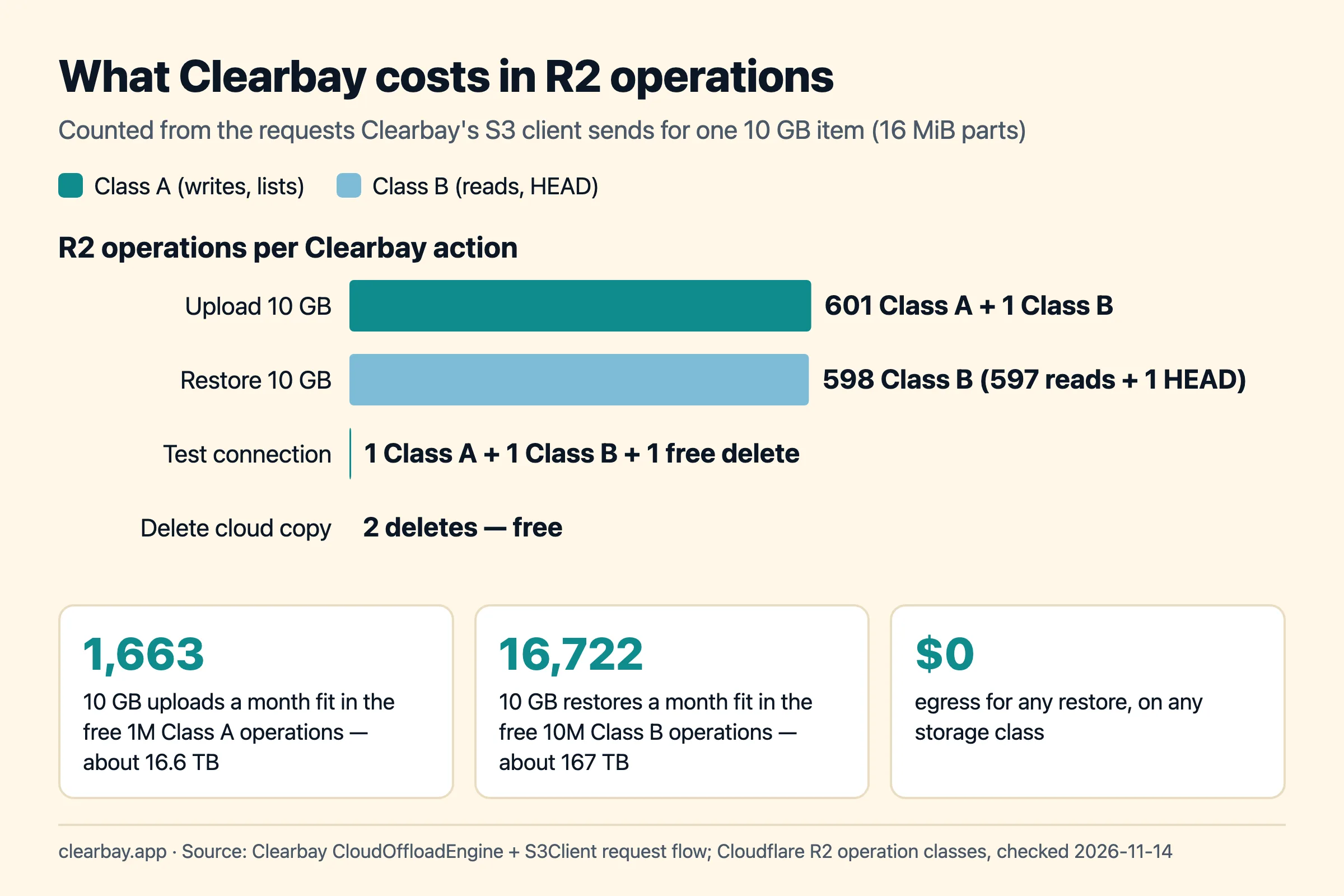
| Clearbay step | R2 operation | Class | Count per 10 GB |
|---|---|---|---|
| Start the upload | CreateMultipartUpload | A | 1 |
| Send the data | UploadPart | A | 597 |
| Check every part's size | ListParts | A | 1 |
| Finish the upload | CompleteMultipartUpload | A | 1 |
| Verify size and metadata | HeadObject | B | 1 |
| Save the manifest | PutObject | A | 1 |
| Restore | HeadObject + ranged GetObject | B | 1 + 597 |
| Delete cloud copy, abort a failed upload | DeleteObject, AbortMultipartUpload | free | 2 |
At that rate, the free 1 million Class A operations cover about 1,663 uploads of 10 GB a month, roughly 16.6 TB. You'll run out of storage budget long before you run out of free operations on Standard. Requests that fail authentication (HTTP 401 or 403) aren't billed, so a mistyped key during setup costs nothing.
R2 limits that matter for Clearbay
- Object size: R2 allows objects up to 4.995 TiB and 10,000 parts per multipart upload. Clearbay caps a single item at 200 GB.
- Part size: Clearbay uses 16 MiB parts until an item passes about 159 GB, then grows them in whole MiB so an upload stays under 9,500 parts. A 200 GB item uses 9,083 parts of 21 MiB. All parts except the last are the same size.
- Metadata: R2 allows 8,192 bytes per object. Clearbay stores only three short values: byte count, file count and an ID.
- Live caches: tool caches that Clearbay rewires to a new path, such as Gradle or Hugging Face caches, can't go to any cloud. See developer caches on a Mac for which ones are safe to clear instead.
Troubleshooting Cloudflare R2 in Clearbay
| Clearbay says | Likely cause | Fix |
|---|---|---|
| The access key ID isn't recognised. | Key partly copied, or the token was deleted or expired. | Create a new token and paste both keys again. |
| The secret key doesn't match the access key. | You pasted the token value or a truncated secret. | Use the Secret Access Key, not the API token value shown above it. |
| These keys can't write to this bucket. | Token is Object Read only, or scoped to a different bucket. | Create a new token with Object Read & Write on this bucket. |
| The bucket doesn't exist at this endpoint. | Wrong Account ID, a typo in the bucket name, or an EU jurisdiction bucket. | Copy the Account ID again. For jurisdiction buckets use Custom with the jurisdiction endpoint. |
| Your Mac's clock is off. | Request signatures are time-stamped. | System Settings → General → Date & Time → turn on Set time and date automatically. |
| A field shows a warning after pasting. | Hidden spaces or line breaks from a web page. | Clearbay removes invisible characters; paste again or retype the value. |
How Clearbay handles R2 offloads
Clearbay is a macOS disk-space app that offers Remove and Offload side by side for every item it finds. When you offload to R2, it streams the item as one .tar object into clearbay/<Mac id>/, checks every part's size, completes the upload, reads the object's size and stored counts back, saves a small JSON manifest, and only then deletes the original from your Mac. If any step fails, your files stay where they were. In Harbor, Offloaded items lists everything in the cloud; View contents shows what's inside an archive without downloading it, and Restore downloads it, checks the SHA-256, file count and size, and puts it back where it was. The R2 copy stays unless you choose Restore & delete from cloud.
Limits today: 200 GB per item and no resume after a crash. Clearbay runs on macOS 14 or later and also supports Amazon S3, Backblaze B2, Wasabi, MEGA S4 and other S3-compatible servers. For other ways to win back space, read how to free up space on a Mac without deleting files, or download Clearbay and test your bucket for free.
FAQ
Is Cloudflare R2 free?
Partly. Each month R2 gives you 10 GB-month of Standard storage, 1 million Class A operations and 10 million Class B operations free, and egress is always free. Beyond that, Standard storage costs $0.015 per GB-month. The free tier doesn't apply to Infrequent Access, and Cloudflare may ask for a payment method when you first enable R2.
Does Cloudflare R2 charge for egress?
No. R2 doesn't charge for data transferred out to the internet, in either storage class. Downloads still count as Class B operations ($0.36 per million in Standard, after 10 million free each month), and Infrequent Access adds a $0.01/GB retrieval fee. Restoring 100 GB from Standard with Clearbay takes about 6,000 reads, well inside the free tier.
Should I use R2 Standard or Infrequent Access for backups?
Use Standard if you store less than about 234 GB or delete items within 30 days. Infrequent Access has no free tier, a 30-day minimum, a $0.01/GB retrieval fee and higher operation prices billed in whole millions. For a year of storage plus one full restore, it only beats Standard above roughly 234 GB.
What permissions does an R2 API token need for Clearbay?
Object Read & Write, applied to the specific bucket you created for Clearbay. Clearbay writes, reads, lists and deletes objects, and handles multipart uploads, but never creates or configures buckets, so Admin permissions aren't needed. An Object Read only token fails the connection test because Clearbay writes and deletes a probe file.
What is the R2 S3 endpoint URL?
It's https://<ACCOUNT_ID>.r2.cloudflarestorage.com, where the Account ID is the 32-character value on your R2 overview page. Buckets created in a jurisdiction, such as the EU, use a jurisdiction-specific endpoint instead. In Clearbay you only enter the Account ID for normal buckets; the app builds the endpoint and uses the region auto.
Is R2 data encrypted?
Cloudflare encrypts every object and its metadata at rest with AES-256, and Clearbay sends everything over HTTPS. Clearbay doesn't add its own encryption before uploading, so anyone with access to your Cloudflare account and the bucket could read the archives. Keep the bucket private, enable two-factor authentication on your Cloudflare account, and use a bucket-scoped token.
Sources
- Cloudflare R2 pricing (storage, operation classes, free tier, rounding)
- R2 API tokens (permissions, Account vs User tokens, key derivation)
- R2 object lifecycles (default multipart expiry, abort rule, wrangler)
- R2 storage classes (bucket default class, 30-day minimum)
- R2 limits (object size, parts, metadata)
- R2 data security (encryption at rest and in transit)