Set Up MEGA S4 on Mac: Endpoints, Pricing, Steps
How to connect MEGA S4 object storage to your Mac: all 14 current endpoints, yearly cost per plan, access keys, and where S4 differs from S3.
 By Clearbay TeamGuides from the people building Clearbay

MEGA S4 is MEGA's S3-compatible object storage. It is included with the Pro Lite, Pro I, Pro Flexi and Business plans at no extra cost, and it is a separate service from the regular MEGA cloud drive. To set up MEGA S4 for your Mac, you create a bucket under Object storage, create an access key, then paste the key, the bucket name and an endpoint such as s3.eu-amsterdam-1.megas4.com into Clearbay under Harbor → Add cloud storage… → MEGA S4.
This guide covers each step. It also covers what most S4 tutorials leave out: the current endpoint list (it changed in 2026), what each plan really costs per year, and the places where S4 behaves differently from Amazon S3.
MEGA S4 vs the MEGA cloud drive
The same MEGA account gives you two very different products. Clearbay works only with S4, because only S4 speaks the S3 protocol.
| MEGA cloud drive | MEGA S4 object storage | |
|---|---|---|
| How apps connect | MEGA's own apps, website and SDK | The S3 API, with any S3-compatible tool |
| Encryption | Zero-knowledge: only you hold the keys | Encrypted, but MEGA manages the keys (not zero-knowledge) |
| Download limit | Cloud drive transfer quota | Up to 5× your stored S4 data per month (egress) |
| Works with Clearbay | No | Yes, via the MEGA S4 preset |
The encryption row matters. MEGA's S4 terms say S4 data "is not zero-knowledge encrypted", because S3 apps need the server to read objects. MEGA's help center suggests encrypting data yourself first if you need exclusive control of the keys. Clearbay uploads a standard tar archive over HTTPS and doesn't add its own encryption layer. So if a folder must stay zero-knowledge, keep it out of S4: use an encrypted external drive instead, or encrypt it before you offload it.
MEGA S4 pricing in November 2026
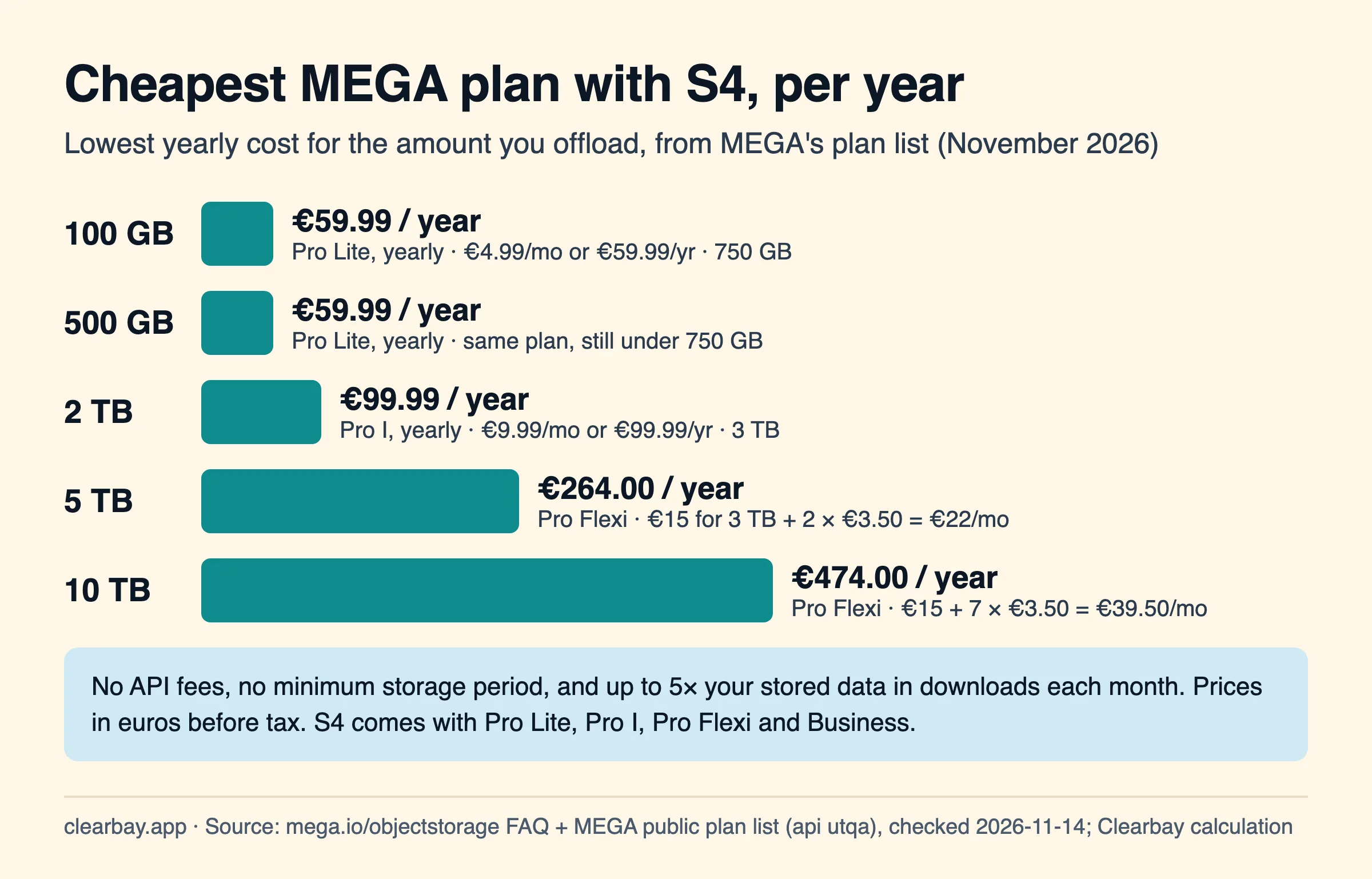
As of November 2026, S4 has no API fees and no minimum storage period. You can download up to five times your stored data each month at no cost. Storage comes from the plan you buy. These are MEGA's euro prices before tax, taken from the same public plan list the MEGA website loads:
| Plan | Storage | Monthly | Yearly | Includes S4 |
|---|---|---|---|---|
| Pro Lite | 750 GB | €4.99 | €59.99 | Yes |
| Pro I | 3 TB | €9.99 | €99.99 | Yes |
| Pro Flexi | 3 TB included, then pay per TB | €15 + €3.50 per extra TB | Billed monthly | Yes |
| Business | 3 TB base, then pay per TB | €5 per user (minimum 3) + €3.50 per extra TB | Billed monthly | Yes |
MEGA's own S4 FAQ gives the Pro Flexi math: 10 TB costs €39.50 a month and 100 TB costs €354.50. The FAQ lists S4 for Pro Lite, Pro I, Pro Flexi and Business only, so check your plan page if you are on Pro II or Pro III.
Some things to know before you choose:
- No 90-day trap. Unlike Wasabi, deleting a cloud copy after a week costs nothing extra. That makes S4 a good fit when you offload something and expect to want it back within a few months.
- Yearly Pro I beats Flexi up to 3 TB. €99.99 a year is about €8.33 a month for 3 TB. Flexi starts at €15 a month for the same 3 TB.
- Restores are covered. Restoring 2 TB in one month from a 2 TB account uses 2 TB of the 10 TB egress allowance.
- Prices are in euros. MEGA shows an estimate in your currency but charges in euros, so your card may add a currency fee.
Step 1: Create a bucket
- Sign in to MEGA on the web and click Object storage in the left panel.
- Click Create bucket, enter a name and click Create.
S4 bucket names follow the S3 rules:
- 3 to 63 characters, using lowercase ASCII letters, digits, dots and hyphens.
- They must start and end with a letter or digit.
- No two dots in a row, and nothing formatted like an IP address.
- No
xn--prefix and no-s3aliassuffix.
MEGA recommends avoiding dots, because dotted names break virtual-hosted HTTPS certificates. Clearbay uses path-style URLs for S4 (endpoint/bucket/key), so dots wouldn't break it, but a name like mac-offload-2026 is the safe choice. Clearbay lowercases whatever you type.
There's no region to pick. Unlike Amazon S3, S4 buckets aren't tied to one location. MEGA says any endpoint can reach any bucket, and data is replicated across its infrastructure.
Step 2: Create an access key, ideally for a sub-user
- In Object storage, click Keys, then Create key.
- Name it
Clearbay, and choose whether it belongs to the root user or a sub-user. For a sub-user, create the user first under Users, then pick it here. - Copy the Access key and Secret key, or click Download to save a credentials file.
A root key can reach every bucket in your account. A sub-user starts with no access at all, because S4 denies everything by default. Grant it this one bucket with a bucket policy: open the bucket, click Bucket settings → Policy and paste the following. Replace the account ID and username with the user's ARN (copy it from Users), and BUCKET with your bucket name:
{
  "Version": "2012-10-17",
  "Statement": [
    { "Effect": "Allow",
      "Principal": { "AWS": "arn:aws:iam::123456789012345:user/clearbay" },
      "Action": "s3:*",
      "Resource": ["arn:aws:s3:::BUCKET", "arn:aws:s3:::BUCKET/*"] }
  ]
}
This is MEGA's documented "single bucket only" pattern. S4 doesn't implement every AWS action name, so a broad s3:* scoped to one bucket is more reliable on S4 than a hand-picked action list. Bucket policies can't name groups, and roles aren't implemented in S4, so name each user ARN directly.
Step 3: Pick an endpoint
MEGA's endpoint list was last updated on September 25, 2026. It now has 14 endpoints in four European cities, two Canadian cities and Tokyo, all named s3.<region>.megas4.com. Pick the one closest to your Mac. Uploads are cached at that endpoint first, then replicated.
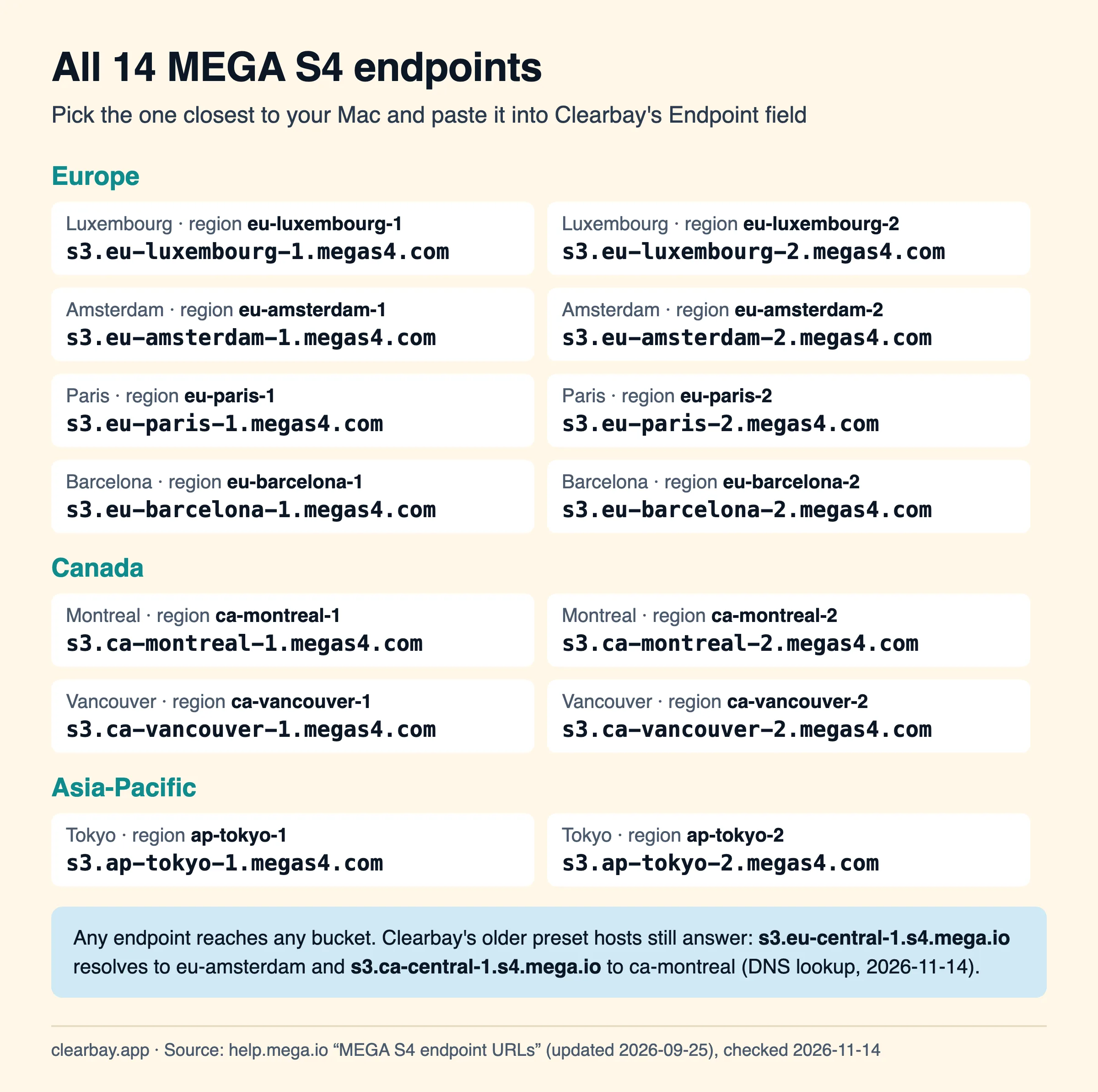
Clearbay's MEGA S4 preset builds https://s3.<region>.s4.mega.io from the Region field and defaults to eu-central-1. That older hostname style still works. On November 14, 2026, s3.eu-central-1.s4.mega.io resolved to MEGA's Amsterdam servers and s3.ca-central-1.s4.mega.io to Montreal. MEGA also runs a global host, s3.g.megas4.com, which currently points to Amsterdam. For anywhere else, paste a current endpoint into the Endpoint field. It always overrides the preset.
Step 4: Connect MEGA S4 in Clearbay
Open Clearbay, go to Harbor, click Add cloud storage… and choose MEGA S4.
| Clearbay field | What to enter |
|---|---|
| Region | Leave the default (eu-central-1). S4 buckets have no region, and MEGA's own AWS CLI guide leaves the region blank. If Test connection reports a region mismatch, the message names the value to use. |
| Endpoint | The closest host from the list above, for example s3.eu-paris-1.megas4.com. https:// is optional. Leave it empty to use the Amsterdam preset. |
| Bucket | Your bucket name |
| Access key ID / Secret access key | The key from step 2 |
Click Test connection. Clearbay writes a tiny probe file under clearbay/<install-id>/, reads it back and deletes it. On S4 that costs nothing, since there are no request fees and no minimum duration. Then click Save. Your keys are stored in the macOS Keychain on this Mac only.
Where S4 differs from Amazon S3, and why Clearbay copes
MEGA publishes its exact S3 coverage in the meganz/s4-specs repository on GitHub. Most S3 tools never hit the differences. A few of them matter for big multipart uploads like Clearbay's:
| S4 rule | Amazon S3 | What Clearbay does |
|---|---|---|
| Parts 1 to N−1 must all be the same size. The last part can be smaller, never larger. | Sizes may vary (5 MiB minimum). | Cuts the stream into fixed 16 MiB parts, larger for items over about 150 GB. Only the last part is smaller. |
| Parts under 5 MB (except the last) abort the whole upload immediately. | Checked only at completion. | Never sends parts under 16 MiB. |
| A part can't be uploaded twice. | Re-uploading replaces the part. | Retries only after a failure. If S4 rejects the retry, Clearbay cancels the upload and keeps your files. Run the plan again. |
| Completed part numbers must run 1, 2, 3… with no gaps. | Gaps allowed. | Numbers parts 1…N and checks the uploaded part list before completing. |
| No lifecycle or versioning API. | Both available. | Nothing to configure. Clean up stray uploads manually (below). |
| 40–50 upload requests per second per account. | Much higher. | Uploads three parts at a time. Even at 1 Gbit/s that's about 22 part uploads a second. |
| Designed for about 20 million objects per account. | No practical limit. | Two objects per offloaded item: one .tar and one .manifest.json. |
That last row is a real advantage of streaming one archive. A tool that uploads file by file would turn a 6,000-file Python environment into 6,000 objects and thousands of requests. Clearbay turns it into two objects and a few dozen requests.
Cleaning up an interrupted upload
When an upload fails, Clearbay aborts it, so normally nothing is left behind. A crash, power loss or force-quit mid-upload can leave parts in the bucket, because v1 doesn't resume. Amazon S3 and Wasabi can delete these with a lifecycle rule. S4 has no lifecycle API, so check by hand with the AWS CLI:
aws s3api list-multipart-uploads --bucket BUCKET \
  --endpoint-url https://s3.eu-amsterdam-1.megas4.com

aws s3api abort-multipart-upload --bucket BUCKET \
  --key "clearbay/…/….tar" --upload-id "UPLOAD_ID" \
  --endpoint-url https://s3.eu-amsterdam-1.megas4.com
Both calls are in MEGA's S4 API list. Because S4 has no minimum storage period, leftover parts cost you only while they exist.
Step 5: Offload and restore
- Pick something large in Forgotten Giants, Download Drift or Space Atlas, and set its action to Offload.
- In the review screen, choose your S4 bucket in the Offload to menu and click Run plan.
- Clearbay streams the item as one tar archive, without writing a temporary copy to disk. It then checks the uploaded size and metadata and saves a manifest with a SHA-256. Only then does it remove the local copy.
- In Harbor, View contents lists what's inside without downloading anything. Restore brings it back and keeps the cloud copy. Restore & delete from cloud also removes it from S4. Restoring is always free in Clearbay.
Limits: each item can be up to 200 GB. Tool caches that Clearbay rewires, such as Gradle, Hugging Face and Xcode DerivedData, can't go to any cloud. They need a local drive. For what each developer cache is, see which developer caches are safe to clear.
Troubleshooting MEGA S4 in Clearbay
| Message | Likely cause | Fix |
|---|---|---|
| "Couldn't reach the storage service" | A typo in the endpoint: a missing s3. prefix, or a city name that isn't on the list. | Copy an endpoint from the list above, or from your S4 settings. On macOS, also check that no firewall or VPN app is blocking Clearbay. |
| "The access key ID isn't recognised" | The key was deleted, or only part of it was copied. | Copy it again from Keys, or download the credentials file. |
| "The keys were refused (403)" or "These keys can't write to this bucket" | A sub-user without a bucket policy, or a policy with the wrong user ARN. | Re-check the Principal ARN and both Resource lines. |
| "The bucket doesn't exist at this endpoint" | Bucket name typo. | Bucket names are lowercase. Check the name in Object storage. |
| "The storage service is busy (429)" | S4 rate limit (SlowDown). | Clearbay retries with backoff automatically. Pause other S3 tools that use the same account. |
| An upload fails partway with "refused the request" | S4 rejected a retried part (no re-uploads allowed). | Your files weren't touched. Run the plan again, ideally on a steadier connection. |
How Clearbay handles MEGA S4
Clearbay is a disk-space app for macOS 14 and later, on Apple silicon and Intel. It's a free download from clearbay.app/download, Developer ID signed and notarized. MEGA S4 is one of six cloud presets, next to Amazon S3, Cloudflare R2, Backblaze B2, Wasabi and custom S3-compatible servers. The Endpoint field stays editable for S4 because MEGA's hostnames have changed over time. Adding a bucket and testing it are free. Offloading to cloud storage is part of the one-time Pro purchase.
Nothing you offload passes through Clearbay's own servers. The upload goes straight from your Mac to MEGA, signed with your key from the Keychain. The regular MEGA cloud drive, the zero-knowledge one, isn't supported, because it doesn't offer an S3 interface.
FAQ
Is MEGA S4 included in my MEGA Pro plan?
According to MEGA's S4 FAQ, S4 comes at no extra cost with Pro Lite, Pro I, Pro Flexi and Business. As of November 2026, Pro Lite costs €4.99 a month for 750 GB, Pro I €9.99 for 3 TB, and Pro Flexi €15 for 3 TB plus €3.50 per extra TB. Look for Object storage in the left panel of the web app.
What is the MEGA S4 endpoint URL?
Endpoints follow the pattern s3.<region>.megas4.com, for example s3.eu-amsterdam-1.megas4.com, s3.ca-montreal-1.megas4.com or s3.ap-tokyo-1.megas4.com. There are 14 in total. Any endpoint reaches any bucket, so pick the one closest to you. Your account's S4 settings page also lists them. The older s4.mega.io hosts still resolve to MEGA's servers too.
Is MEGA S4 end-to-end encrypted?
No. MEGA's S4 terms say S4 data is encrypted but not zero-knowledge, because MEGA manages the keys so S3 tools can work. The regular cloud drive stays zero-knowledge. If you need that for offloaded files, encrypt them before uploading or use a different destination.
Does MEGA S4 charge for downloads or API calls?
No API fees. Each month you can download up to five times the amount you store in S4. Downloads beyond that count as excessive under MEGA's fair-use terms. Restoring an offloaded item, even all of them in one month, stays well inside that allowance.
Does MEGA S4 have a minimum storage period?
No. MEGA states there is no minimum storage period, so deleting an object after one day costs nothing extra. That differs from Wasabi, which bills any object deleted before 90 days for the full 90 days on Pay as You Go.
Which region should I type for MEGA S4?
Buckets in S4 aren't tied to a region, and MEGA's AWS CLI guide tells you to leave the region blank. In Clearbay, keep the default and put your preferred host in the Endpoint field. If a test ever reports a region mismatch, Clearbay's message names the region S4 expects.
Can Clearbay use my regular MEGA cloud drive?
Not directly. Clearbay talks to S3-compatible storage, and the cloud drive uses MEGA's own protocol. You can move a folder from the cloud drive into S4 inside the MEGA web app, and Clearbay will see it as objects in a bucket. Its encryption then changes from zero-knowledge to S4's MEGA-managed model.
Sources
- MEGA S4 object storage: pricing FAQ, plans with S4, 5× egress, no minimum storage period, checked November 14, 2026
- MEGA Help Centre: MEGA S4 endpoint URLs (updated September 25, 2026)
- MEGA Help Centre: Getting started with MEGA S4
- MEGA Help Centre: S4 rate limits and performance guidance
- MEGA Help Centre: Bucket policies and policies hierarchy
- MEGA Help Centre: Bucket naming conventions
- MEGA Help Centre: AWS CLI setup guide for MEGA S4
- MEGA Help Centre: Why encryption changes when you move data to S4
- MEGA Terms of Service: Additional Terms for MEGA S4
- meganz/s4-specs on GitHub: S3 API coverage, multipart part rules
- Plan prices: MEGA's public plan list (the data mega.io/pricing loads), queried November 14, 2026. DNS lookups of the legacy s4.mega.io hosts, November 14, 2026.