Set Up Backblaze B2 for Clearbay: Keys, Lifecycle, Costs
Create a private B2 bucket and a bucket-restricted key for Clearbay, stop deleted files from billing, and compare B2 costs with Cloudflare R2 and Amazon S3.
 By Clearbay TeamGuides from the people building Clearbay

To set up Backblaze B2 for Clearbay, create a private B2 bucket, set its lifecycle to Keep only the last version of the file, and make an application key with Read and Write access to that bucket only. Then paste the region from the bucket's endpoint, the bucket name, the keyID and the applicationKey into Harbor → Add cloud storage… → Backblaze B2 and click Test connection. Done right, B2 is the cheapest of the big S3-compatible services for Mac archives in our comparison: $82.57 to keep 1 TB for a year and download all of it once. Skip the lifecycle step, though, and files you delete from the cloud keep billing.
Prices are from Backblaze's pay-as-you-go pricing page, checked 2026-11-14.
Before you start
- A Backblaze B2 account. B2 Cloud Storage is separate from Backblaze's Computer Backup plan. When you sign up, you pick a region (for example US West or EU Central). Backblaze ties each account to a single region, and every bucket in it lives there.
- Clearbay on macOS 14 or later, free from clearbay.app/download. Adding and testing a bucket is free; offloading to cloud storage is part of Pro.
- Ten minutes. Most of it is clicking through three Backblaze pages.
If you have a spare drive, offloading to an external drive costs nothing per month. B2 is the better choice when you want an off-site copy or travel without the drive.
Step 1: Set up a Backblaze B2 bucket
- Sign in at backblaze.com and open B2 Cloud Storage → Buckets → Create a Bucket.
- Bucket Unique Name: use lowercase letters, digits and hyphens, for example
clearbay-jane-mbp. Names are global across all Backblaze customers, so add something personal. Lowercase keeps the name valid for every S3 tool. - Files in Bucket are: choose Private.
- Default Encryption: choose Enable. B2 then encrypts new files at rest with its own managed keys (SSE-B2). Clearbay doesn't need to send anything special for this.
- Object Lock: leave it Disabled. Locked files can't be deleted until their retention ends, which would stop Clearbay's Delete cloud copy from freeing space.
- Click Create a Bucket. The bucket card now shows an Endpoint such as
s3.us-west-004.backblazeb2.com. The part betweens3.and.backblazeb2.comis your region, hereus-west-004. Write it down.
Step 2: Change the lifecycle so deleted files really go away
This is the step most B2 guides skip. B2 buckets keep every version of every file by default. When an S3 app such as Clearbay deletes an object, Backblaze's S3 API documentation says B2 inserts a delete marker and the data underneath stays. Backblaze also states that hidden files count toward your stored data until they're actually deleted. So with the default setting, Restore & delete from cloud or Delete cloud copy in Clearbay makes the item disappear from listings, but you keep paying for it.
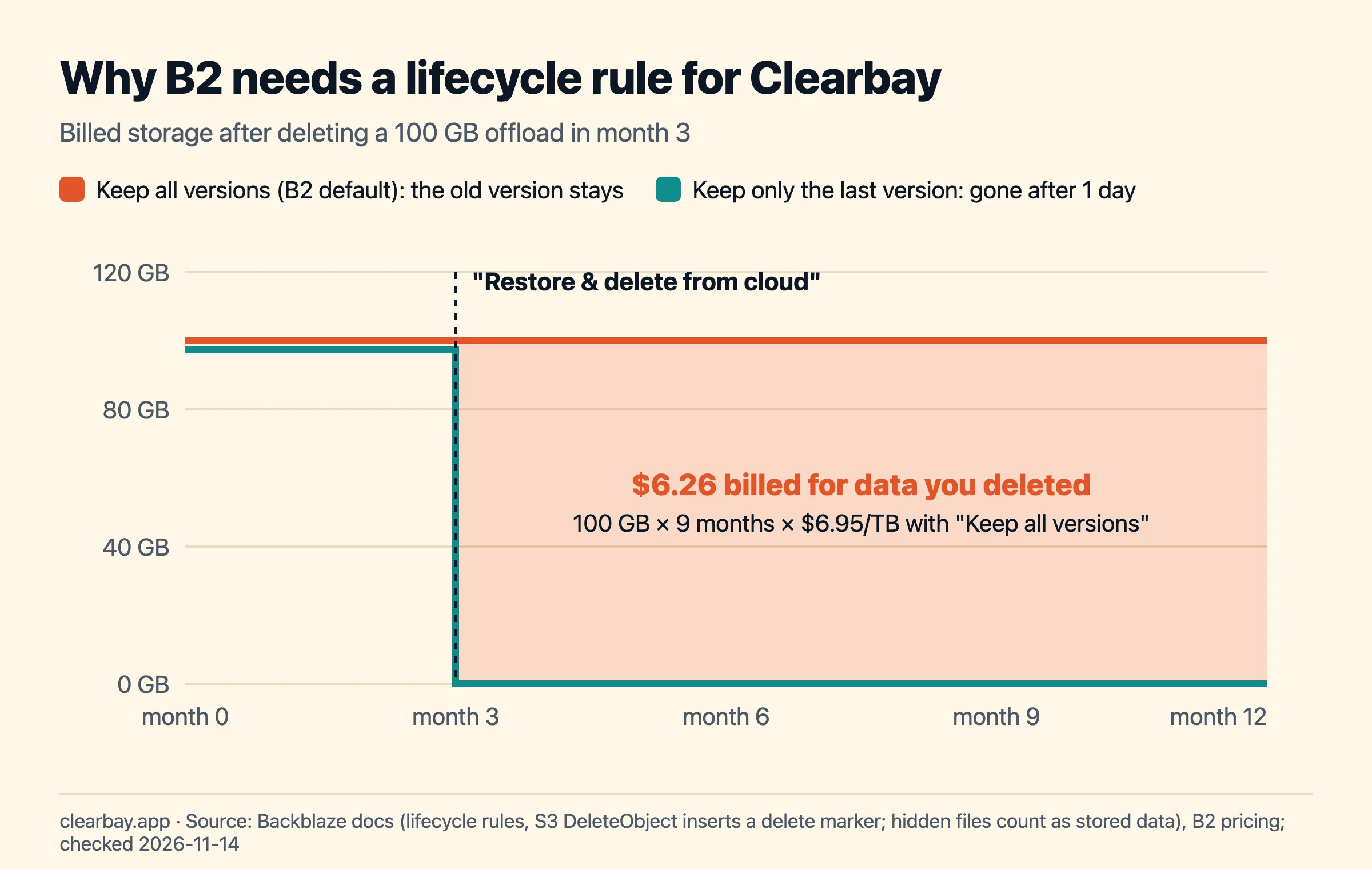
To fix it:
- On the bucket card, click Lifecycle Settings.
- Choose Keep only the last version of the file and click Update Bucket.
Backblaze documents this preset as the rule below: a hidden (deleted) version is removed one day after it's hidden. Clearbay gives every offload a unique file name and never overwrites one, so you lose nothing by not keeping old versions.
[
  {
    "fileNamePrefix": "",
    "daysFromUploadingToHiding": null,
    "daysFromHidingToDeleting": 1
  }
]
Optional: cancel unfinished uploads
Large items go up as multipart uploads, which B2 calls large files. If your Mac crashes mid-upload, Clearbay can't resume it yet, and Backblaze bills the parts already stored. B2 lifecycle rules have a third field for this, daysFromStartingToCancelingUnfinishedLargeFiles. The web console's presets don't set it, but you can through Use custom lifecycle rules if your console offers the field, or with the B2 command-line tool or native API. A rule that does both jobs:
[
  {
    "fileNamePrefix": "",
    "daysFromUploadingToHiding": null,
    "daysFromHidingToDeleting": 1,
    "daysFromStartingToCancelingUnfinishedLargeFiles": 3
  }
]
Why three days? The count starts when the upload begins. A 200 GB item, Clearbay's per-item maximum, takes about 22 hours at a 20 Mbit/s upload speed (200 GB × 8 ÷ 20 Mbit/s), so one day could cancel an upload that's still running. When Clearbay stops an upload itself, after an error or when you cancel, it aborts the upload and nothing is left behind.
Step 3: Create an application key for this bucket only
- Open B2 Cloud Storage → Application Keys → Add a New Application Key.
- Name it after the Mac, such as
clearbay-jane-mbp. - Allow access to Bucket(s): pick your bucket, not All.
- Type of Access: Read and Write.
- Allow List All Bucket Names: leave it off. Backblaze recommends it for SDKs that list buckets on startup, but Clearbay never lists buckets; it goes straight to the one you name.
- File name prefix (optional): enter
clearbay/. Clearbay stores everything underclearbay/<this-Mac's-id>/, so this limits the key to Clearbay's own files even if the bucket holds other things. - Duration (optional): leave empty for a key that doesn't expire, or enter seconds (under 1,000 days). An expired key makes uploads and restores fail until you paste a new one.
- Click Create New Key and copy the keyID and applicationKey. B2 shows the applicationKey only once.
Don't use the Master Application Key. Backblaze's S3-compatible API doesn't accept it, and it can reach every bucket in your account anyway.
Which permissions does the key really use? We listed every request Clearbay's S3 client sends and matched each to the B2 capability that covers its native equivalent:
| When Clearbay… | S3 request | B2 capability |
|---|---|---|
| Uploads an item | PutObject, CreateMultipartUpload, UploadPart, CompleteMultipartUpload | writeFiles |
| Checks every part before finishing | ListParts | writeFiles (b2_list_parts) |
| Cleans up a failed upload | AbortMultipartUpload | writeFiles (b2_cancel_large_file) |
| Verifies and restores | HeadObject, ranged GetObject | readFiles |
| Deletes a cloud copy or the test file | DeleteObject | deleteFiles |
| Shows how much is stored | ListObjectsV2 under clearbay/ | listFiles |
A Read and Write key covers all of these. Read Only fails Test connection, because Clearbay writes and deletes a small probe file; Write Only fails because Clearbay reads the probe back.
Step 4: Connect Backblaze B2 in Clearbay
- In Clearbay, open Harbor and click Add cloud storage….
- Choose Backblaze B2 and fill in the fields below.
- Click Test connection. Clearbay writes a probe file under
clearbay/, reads its size back and deletes it. When it says "Connected. Clearbay can write, read and delete in this bucket.", click Save. - Tick Offload here from now on if B2 should be your default cloud destination.
| Clearbay field | What to paste |
|---|---|
| Region | The region from the bucket's endpoint, for example us-west-004 or eu-central-003 |
| Bucket | The bucket name, exactly as created |
| Access key ID | The keyID |
| Secret access key | The applicationKey; Clearbay saves it only in this Mac's Keychain |
Clearbay builds the endpoint https://s3.<region>.backblazeb2.com and uses path-style addresses, which B2 supports. It also removes invisible characters picked up when you paste from a web page.
Backblaze B2 pricing vs Cloudflare R2 and Amazon S3
B2's pay-as-you-go price is $6.95 per TB per month, the first 10 GB are free, and there's no minimum storage duration or file size. Class A, B and C API calls, which include every request Clearbay makes, are free. Downloads are free up to three times your average monthly stored data; above that, they cost $0.01 per GB.
We priced a realistic year for each service: upload 100 GB or 1 TB of Mac files as 10 GB items, keep them 12 months, then restore everything once. Request counts come from Clearbay's code: 601 write requests and 598 read requests per 10 GB item.
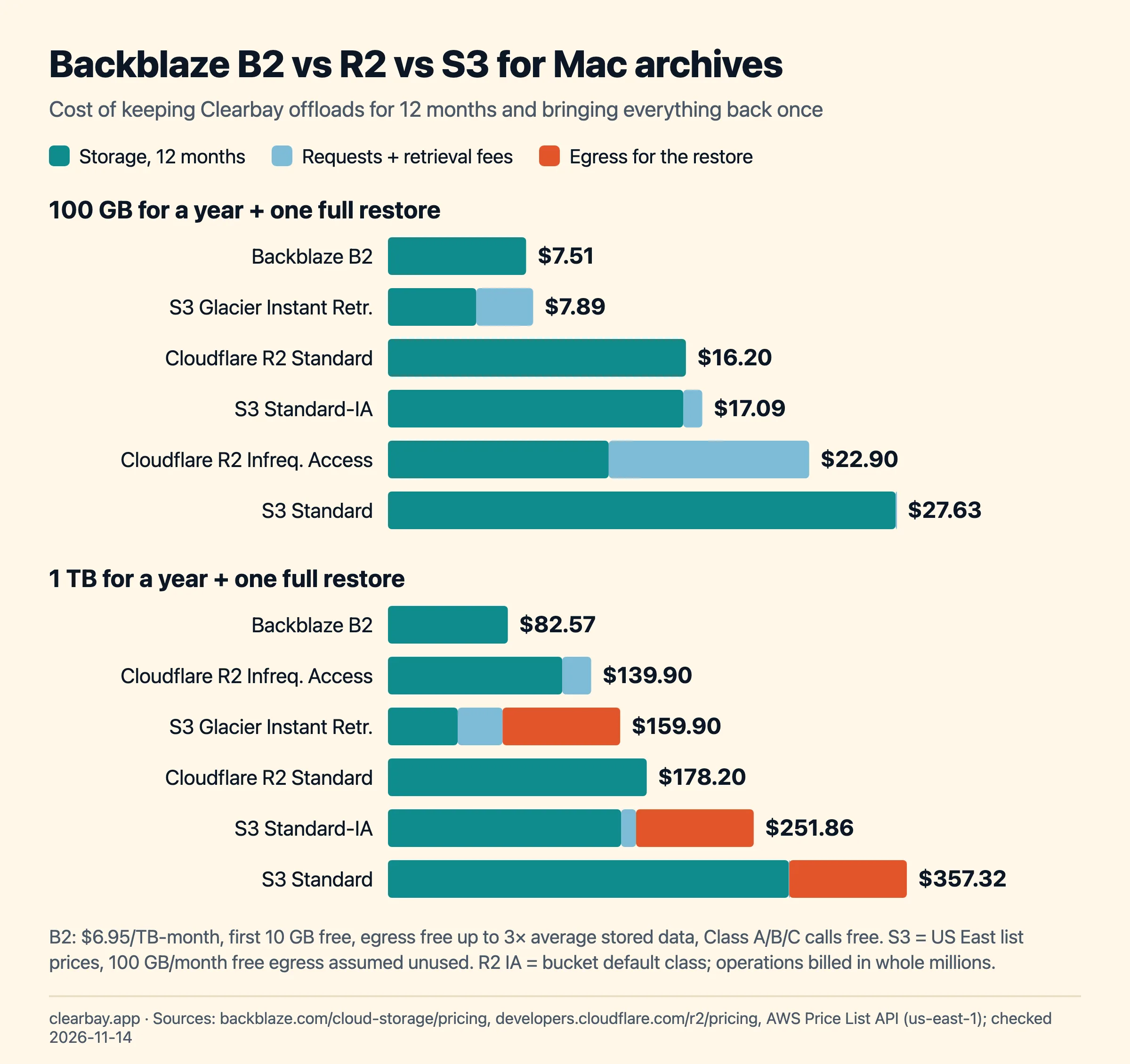
| Service | 100 GB, 1 year + restore | 1 TB, 1 year + restore | Where the money goes |
|---|---|---|---|
| Backblaze B2 | $7.51 | $82.57 | Storage only; restore within the 3× free egress |
| Amazon S3 Glacier Instant Retrieval | $7.89 | $159.90 | $0.03/GB retrieval and $0.09/GB egress past 100 GB |
| Cloudflare R2 Standard | $16.20 | $178.20 | Storage only; no egress fees |
| Cloudflare R2 Infrequent Access | $22.90 | $139.90 | Operations billed in whole millions, retrieval fee |
| Amazon S3 Standard | $27.63 | $357.32 | Storage, then $81 egress for 1 TB |
What B2's free-egress rule means in practice: if you store 100 GB, you can download up to about 300 GB that month without paying for transfer. Restoring everything once, or even twice, stays free. You'd only pay egress if you restored far more than you store, for example pulling 1 TB of other data through the same account while storing 100 GB.
The B2 numbers assume the lifecycle fix from Step 2. Without it, every item you delete from the cloud keeps costing $6.95 per TB-month for as long as its hidden version exists. For a closer look at the other two services, see our Cloudflare R2 setup and Amazon S3 setup guides.
How Clearbay uploads to B2
Clearbay streams each item as one tar archive straight into B2 with no temporary copy on your disk, which matters when your disk is already full. Small items go up in a single request. Bigger ones become a B2 large file uploaded in 16 MiB parts, three at a time. B2 allows parts from 5 MB to 5 GB and large files up to 10 TB; Clearbay's own limit is 200 GB per item. Above about 159 GB, Clearbay grows the part size in whole MiB to stay under 9,500 parts, so a 200 GB item uploads as 9,083 parts of 21 MiB.
After the last part, Clearbay lists the uploaded parts and checks every size, finishes the file, reads its size and stored byte and file counts back, and confirms the source didn't change during the upload. Only then does it save a small manifest next to the archive and delete the original from your Mac. Any failure leaves your files in place.
Troubleshooting Backblaze B2 in Clearbay
| Symptom | Likely cause | Fix |
|---|---|---|
| "The access key ID isn't recognised" or "The keys were refused" | Master application key, a deleted or expired key, or the wrong region. | Create a new bucket key in Step 3 and check the region against the bucket's endpoint. |
| "The secret key doesn't match the access key." | applicationKey pasted partly or from another key. | Paste it again; if lost, create a new key. |
| "These keys can't write to this bucket." | Read Only key, key restricted to another bucket, or a file name prefix other than clearbay/. | Create a Read and Write key for this bucket with no prefix or clearbay/. |
| "The bucket doesn't exist at this endpoint." | Typo, or a region from a different account. | Copy the bucket name and endpoint from the bucket card. |
| "Your Mac's clock is off." | Signed requests are time-stamped. | System Settings → General → Date & Time → Set time and date automatically. |
| B2 storage doesn't drop after deleting cloud copies. | Bucket keeps all versions. | Set Keep only the last version of the file (Step 2). Hidden versions disappear about a day later. |
If Clearbay's Offload button says "Live caches need a local drive", the item is a tool cache that Clearbay rewires to a new path. Those can't go to any cloud; offload them to an external drive or clear them. Our guide to developer caches on a Mac lists which ones are safe to clear.
How Clearbay handles B2 offloads
Clearbay is a macOS disk-space app that shows Remove and Offload side by side for everything it finds. Cloud offload is for files you want off the Mac but not gone: finished projects, raw footage, old installers. Offloaded items are listed in Harbor under Offloaded items. View contents lists what's inside an archive without downloading it. Restore downloads the archive into a temporary folder, checks its SHA-256, file count and size, and only then moves it back to its original place; it needs the item's size plus about 500 MB free. The B2 copy stays unless you choose Restore & delete from cloud.
Current limits: 200 GB per item, no resume after a crash, and live tool caches need a local drive. Clearbay runs on macOS 14 or later on Apple silicon and Intel and also works with Amazon S3, Cloudflare R2, Wasabi, MEGA S4 and other S3-compatible servers. For more ways to get space back, read how to free up space on a Mac without deleting files, or download Clearbay and test your B2 bucket for free.
FAQ
How much does Backblaze B2 cost per month?
Pay-as-you-go B2 costs $6.95 per TB per month as of November 2026, billed by the byte-hour, with the first 10 GB free. There's no minimum storage duration or file size, and Class A, B and C API calls are free. So 100 GB costs about $0.63 a month and 1 TB about $6.88 after the free 10 GB.
Does Backblaze B2 charge for downloads?
Only past a generous allowance. Downloads are free up to three times your average monthly stored data; beyond that, egress costs $0.01 per GB. If you store 100 GB, about 300 GB of downloads a month are free, so restoring all your Clearbay offloads once costs nothing extra.
Why doesn't deleting files in B2 free up space?
B2 buckets keep all file versions by default. Deleting through the S3 API adds a delete marker, which hides the file, but the old version stays stored and billed. Set the bucket's Lifecycle Settings to Keep only the last version of the file, and hidden versions are removed one day after they're hidden.
Can I use the Backblaze master application key with S3 apps?
No. Backblaze's S3-compatible API doesn't accept the master application key that's created automatically with your account. Create a separate application key under B2 Cloud Storage → Application Keys, ideally restricted to one bucket with Read and Write access. Use its keyID as the access key ID and its applicationKey as the secret.
What is my Backblaze B2 S3 endpoint and region?
Every bucket card shows an endpoint like s3.us-west-004.backblazeb2.com. The region is the middle part, here us-west-004. Each Backblaze account belongs to one region, chosen at sign-up, so all your buckets share it. In Clearbay you enter just the region; the app builds the endpoint.
Is Backblaze B2 cheaper than Amazon S3?
For storing and occasionally restoring Mac archives, yes. In our calculation, keeping 1 TB for a year and restoring it once costs $82.57 on B2, versus $357.32 on S3 Standard and $159.90 on S3 Glacier Instant Retrieval (US East). Most of the gap is S3's storage price and its $0.09/GB internet egress.
Is my data encrypted on Backblaze B2?
If you enable Default Encryption on the bucket, B2 encrypts new files at rest with Backblaze-managed keys (SSE-B2). Clearbay uploads over HTTPS but doesn't encrypt the archive itself first. Keep the bucket private, turn on two-factor authentication for your Backblaze account, and use a bucket-restricted key.
Sources
- Backblaze B2 pricing (storage, free 10 GB, 3× free egress, transaction classes, no minimums)
- Backblaze B2 transaction pricing (which S3 calls are Class A, B, C)
- B2 lifecycle rules (keep all versions by default, hidden files billed, rule fields)
- B2 S3 Delete Object (delete marker when no version ID is given)
- S3-compatible app keys (master key not supported, listAllBucketNames)
- Create and manage app keys
- B2 large files (part sizes, 10 TB limit, billing for parts)
- Introduction to the S3-compatible API (endpoint format, one region per account, versioning)