S3-Compatible Server for Mac Offloads: Garage, Ceph
Use your own S3-compatible server (Garage, Ceph RGW, SeaweedFS, MinIO, NAS apps) as a Mac offload target, with Mac-specific HTTPS rules and sizing math.
 By Clearbay TeamGuides from the people building Clearbay

Clearbay can offload Mac files to any S3-compatible server you run yourself: Garage, Ceph RGW, SeaweedFS, MinIO, RustFS, or a NAS app such as QNAP QuObjects. To set it up, create a bucket and an access key on the server, then enter the server URL, the region, the bucket and the key in Clearbay under Harbor → Add cloud storage… → Custom, with path-style URLs turned on. On a Mac, two details decide whether it works. Use https://, or a .local name for plain HTTP, because macOS blocks unencrypted connections to IP addresses. And allow Clearbay in the Local Network prompt.
This guide gives you a compatibility matrix checked against each project's own docs and source code, the Mac-side connection rules, setup commands for the common servers, and a sizing calculation for how much raw disk your offloads will need.
First: what happened to MinIO
Most self-hosted S3 guides still say "install MinIO". As of November 2026, that advice is out of date:
- The
minio/minioGitHub repository is archived and reads "THIS REPOSITORY IS NO LONGER MAINTAINED". The community edition is distributed as source code only, with no prebuilt binaries. - MinIO now points community users to AIStor Free, a standalone edition under a free license, and sells AIStor Enterprise.
- TrueNAS removed its MinIO (Stable) app from the catalog on July 9, 2026. Its community catalog now carries Garage (v2.5.0), SeaweedFS (4.53) and RustFS (1.0.5).
An existing MinIO server still works fine with Clearbay. It speaks the same S3 API it always has. But if you are starting fresh, choose a project that still ships updates. For a home or small-office setup, Garage and SeaweedFS are the lightest of the actively maintained options. Ceph RGW fits if you already run Ceph.
Compatibility matrix: what Clearbay needs from your server
Clearbay's needs are modest: SigV4 signing, path-style or virtual-hosted URLs, multipart uploads of 16 MiB parts, HeadObject with x-amz-meta-* metadata, ListParts, ListObjectsV2 and DeleteObject. Every server below supports all of them. The differences are in the details you have to type correctly.
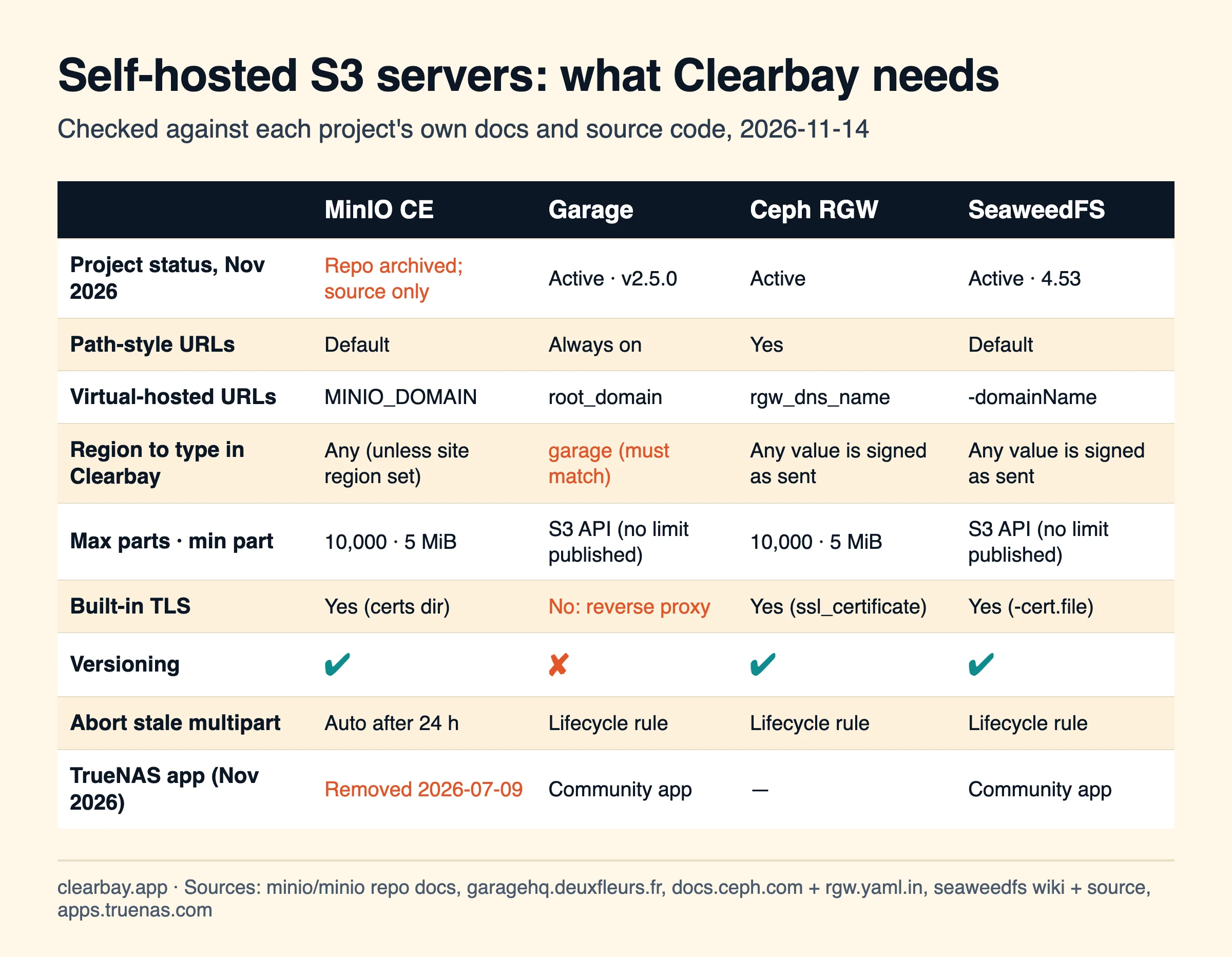
| MinIO CE | Garage | Ceph RGW | SeaweedFS | |
|---|---|---|---|---|
| Default S3 port | 9000 | 3900 | Set by frontend config | 8333 |
| Path-style | Default | Always enabled | Yes | Default |
| Virtual-hosted | MINIO_DOMAIN | root_domain (wildcard DNS and certificate) | rgw_dns_name | -domainName |
| Region in Clearbay | Any value, unless MINIO_SITE_REGION is set, which must then match | Must equal s3_region, which defaults to garage | The signature uses whatever region you send | The signature uses whatever region you send |
| Multipart limits | 10,000 parts, 5 MiB to 5 TiB each, 50 TiB per object | Standard S3 multipart | 10,000 parts (rgw_multipart_part_upload_limit), 5 MiB minimum | Standard S3 multipart |
| TLS | Built in (~/.minio/certs) | None. Use a reverse proxy | Built in (ssl_certificate) | Built in (-cert.file, -key.file) |
| Versioning | Yes | No | Yes | Yes |
| Stale multipart cleanup | Automatic after 24 h (stale_uploads_expiry) | Lifecycle rule (AbortIncompleteMultipartUpload) | Lifecycle rule | Lifecycle rule |
Two rows catch people out.
Garage's region. Garage rejects any region other than its configured s3_region. Clearbay's Custom preset defaults to us-east-1, so type garage unless you changed it. If you forget, Clearbay's error message names the region Garage expects.
Clearbay's part sizes. Clearbay uses 16 MiB parts and grows them for items over about 150 GB, so it never comes near the 10,000-part cap. The largest item Clearbay offloads, 200 GB, uploads in about 9,100 parts of 21 MiB.
Mac-side rules: HTTPS, ATS and the Local Network prompt
Most self-hosted guides assume a Linux client. On a Mac, Apple's App Transport Security (ATS) decides which URLs an app may reach, and Clearbay ships with Apple's defaults. According to Apple's documentation, macOS 10.12 through 13 allowed plain HTTP to IP addresses, .local names and dotless names. From macOS 14, plain HTTP to IP addresses is no longer allowed by default.
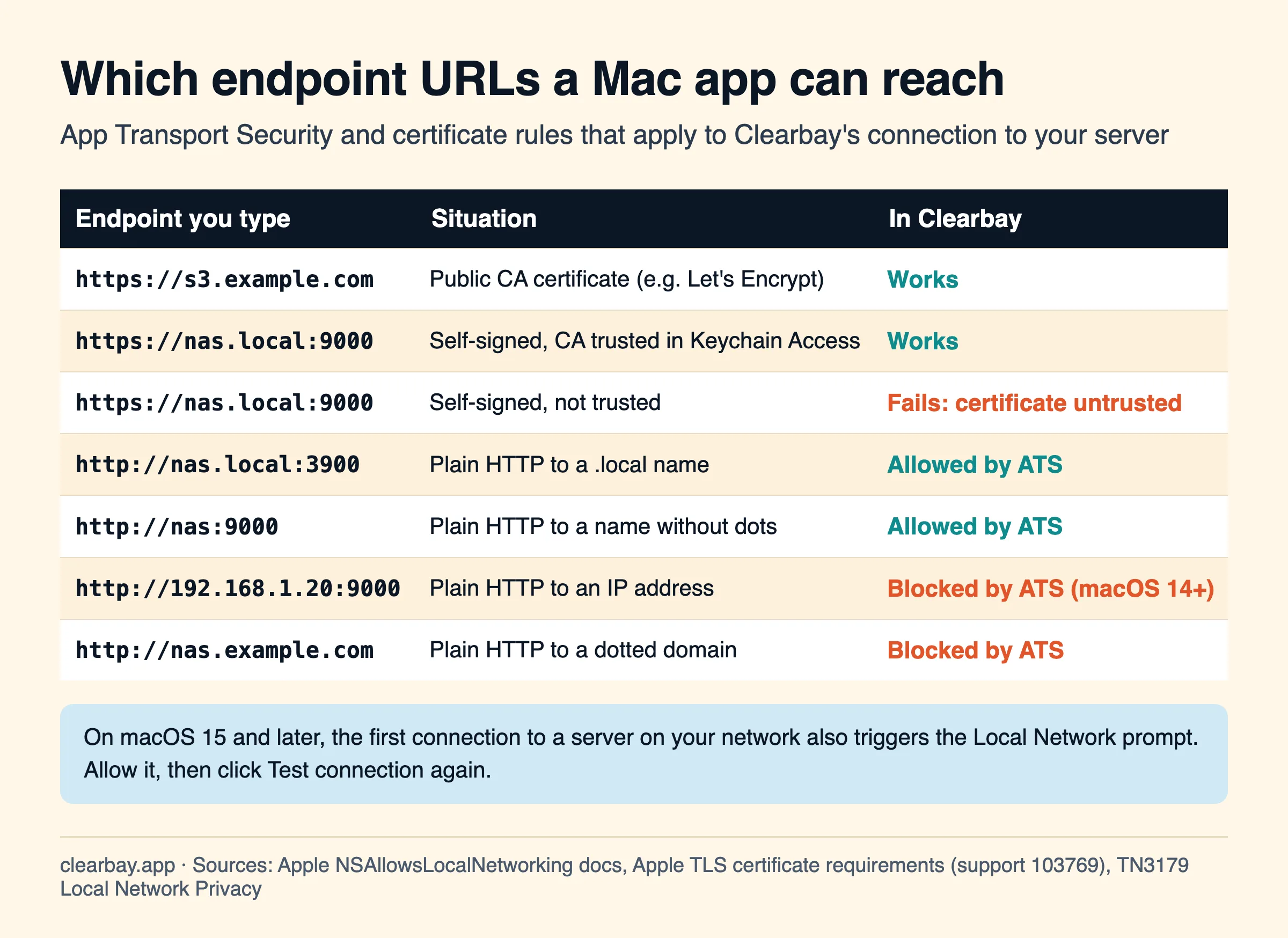
In practice:
- Best: HTTPS with a real certificate. A reverse proxy (Caddy, nginx, Traefik) with a Let's Encrypt certificate for
s3.yourdomain.comworks from anywhere, including away from home. - Fine on your home network: HTTP to a Bonjour name.
http://nas.local:3900orhttp://nas:9000work, because ATS allows.localand dotless names. Your access key still signs every request, but the data travels unencrypted on your LAN. - Won't work: HTTP to an IP such as
http://192.168.1.20:9000, or HTTP to a normal domain name. Use the server's.localname, or add TLS.
Local Network permission (macOS 15 and later). The first time Clearbay contacts a device on your LAN, macOS asks whether to allow it. Apple notes that the first request may fail before you answer. Click Allow, then click Test connection again. If you clicked Don't Allow, go to System Settings → Privacy & Security → Local Network and turn Clearbay on.
Self-signed certificates that a Mac will trust
Apple applies the same rules to every TLS server certificate. The key must be RSA 2048-bit or larger. The signature must use SHA-2. The server's DNS name must appear in Subject Alternative Name, because the Common Name alone isn't accepted. And certificates issued after July 1, 2019 need the serverAuth extended key usage and a validity of 825 days or less. This one command on the server, with OpenSSL 1.1.1 or later, produces a certificate that meets all of them:
openssl req -x509 -newkey rsa:2048 -sha256 -days 825 -nodes \
  -keyout private.key -out public.crt -subj "/CN=nas.local" \
  -addext "subjectAltName=DNS:nas.local" \
  -addext "extendedKeyUsage=serverAuth"
Then copy public.crt to your Mac and trust it:
- Double-click
public.crt. Keychain Access opens and adds it to your login keychain. - Double-click the certificate, expand Trust, and set When using this certificate to Always Trust.
- Close the window and confirm with your password.
Without these steps, Clearbay reports a certificate error and stops, and it never retries an untrusted certificate. If you reach the server by IP over HTTPS, the certificate needs that IP in its Subject Alternative Name too (IP:192.168.1.20).
Step 1: Create a bucket and a key on your server
Give Clearbay its own bucket and a key that can only use that bucket. Here is the shortest path for each server.
Garage
garage bucket create clearbay
garage key create clearbay-mac
garage bucket allow --read --write clearbay --key clearbay-mac
Garage uses its own per-key, per-bucket permissions instead of S3 policies. The key create output shows the Key ID and secret. Garage serves S3 on port 3900 and has no TLS of its own, so put it behind a reverse proxy for HTTPS. If you do, set public_endpoint in garage.toml to match.
Ceph RGW
radosgw-admin user create --uid=clearbay-mac --display-name="Clearbay Mac"
aws s3 mb s3://clearbay --endpoint-url https://rgw.example.com
Run the second command with the new user's keys, so that user owns the bucket. For the region, the zonegroup's api_name or us-east-1 are both reasonable. RGW's SigV4 code takes the region from the request rather than comparing it with a fixed value.
SeaweedFS
Add an identity to the S3 config file that SeaweedFS loads with -config (or -s3.config), using bucket-scoped actions:
{ "identities": [ {
    "name": "clearbay-mac",
    "credentials": [ { "accessKey": "CLEARBAYKEY", "secretKey": "a-long-random-secret" } ],
    "actions": [ "Read:clearbay", "Write:clearbay", "List:clearbay" ]
} ] }
MinIO or AIStor (existing servers)
mc mb mynas/clearbay
mc admin policy create mynas clearbay-rw clearbay-policy.json
mc admin user add mynas clearbay-mac 'a-long-random-secret'
mc admin policy attach mynas clearbay-rw --user clearbay-mac
Here clearbay-policy.json grants s3:ListBucket and s3:ListBucketMultipartUploads on arn:aws:s3:::clearbay, plus s3:GetObject, s3:PutObject, s3:DeleteObject, s3:AbortMultipartUpload and s3:ListMultipartUploadParts on arn:aws:s3:::clearbay/*.
NAS apps
On TrueNAS, install Garage, SeaweedFS or RustFS from the Community catalog, then follow the matching steps above. QNAP's QuObjects app is an S3-compatible service with multipart upload support. Create a bucket and an access key in its interface and treat it like any other Custom server. For any app, find the port, whether it serves HTTPS, and which region it expects.
Step 2: Add your S3-compatible server in Clearbay
Open Harbor → Add cloud storage… and choose Custom.
| Field | What to enter |
|---|---|
| Endpoint | The full URL with scheme and port, for example https://s3.example.com or http://nas.local:3900. Don't add the bucket name. |
| Region | garage for Garage. Your MINIO_SITE_REGION if you set one. Otherwise us-east-1. |
| Bucket | clearbay, or whatever you created. Custom keeps capitals, because some servers allow them. |
| Access key ID / Secret access key | The key from step 1 |
| Path-style URLs | On (the default). Turn it off only if your server serves each bucket on its own subdomain with matching wildcard DNS and certificate. |
Click Test connection. Clearbay writes a tiny probe file, reads its size back and deletes it, all under clearbay/<install-id>/. Click Save. The keys are stored in your Mac's Keychain.
Step 3: Add a cleanup rule for interrupted uploads
If an upload fails, Clearbay aborts it and your files stay put. A crash or power loss mid-upload, though, can leave parts behind, because v1 doesn't resume. On Garage, Ceph and SeaweedFS, add a lifecycle rule once. MinIO already expires stale uploads after 24 hours.
cat > abort.json <<'JSON'
{ "Rules": [ { "ID": "abort-stale-uploads", "Status": "Enabled",
    "Filter": { "Prefix": "" },
    "AbortIncompleteMultipartUpload": { "DaysAfterInitiation": 1 } } ] }
JSON
aws s3api put-bucket-lifecycle-configuration --bucket clearbay \
  --lifecycle-configuration file://abort.json --endpoint-url https://s3.example.com
Garage accepts only AbortIncompleteMultipartUpload and Expiration rules, and wants the prefix inside Filter, as above.
Sizing: how much raw disk your offloads need
An offload server holds the only copy of what you offload. Clearbay deletes the Mac's copy after a verified upload, so the server needs redundancy, and it needs headroom to stay healthy. Multiply your target by the redundancy overhead, then divide by your fill limit. TrueNAS recommends staying around 80% full on ZFS. Ceph warns at 85% (mon_osd_nearfull_ratio) and stops writes at 95%.
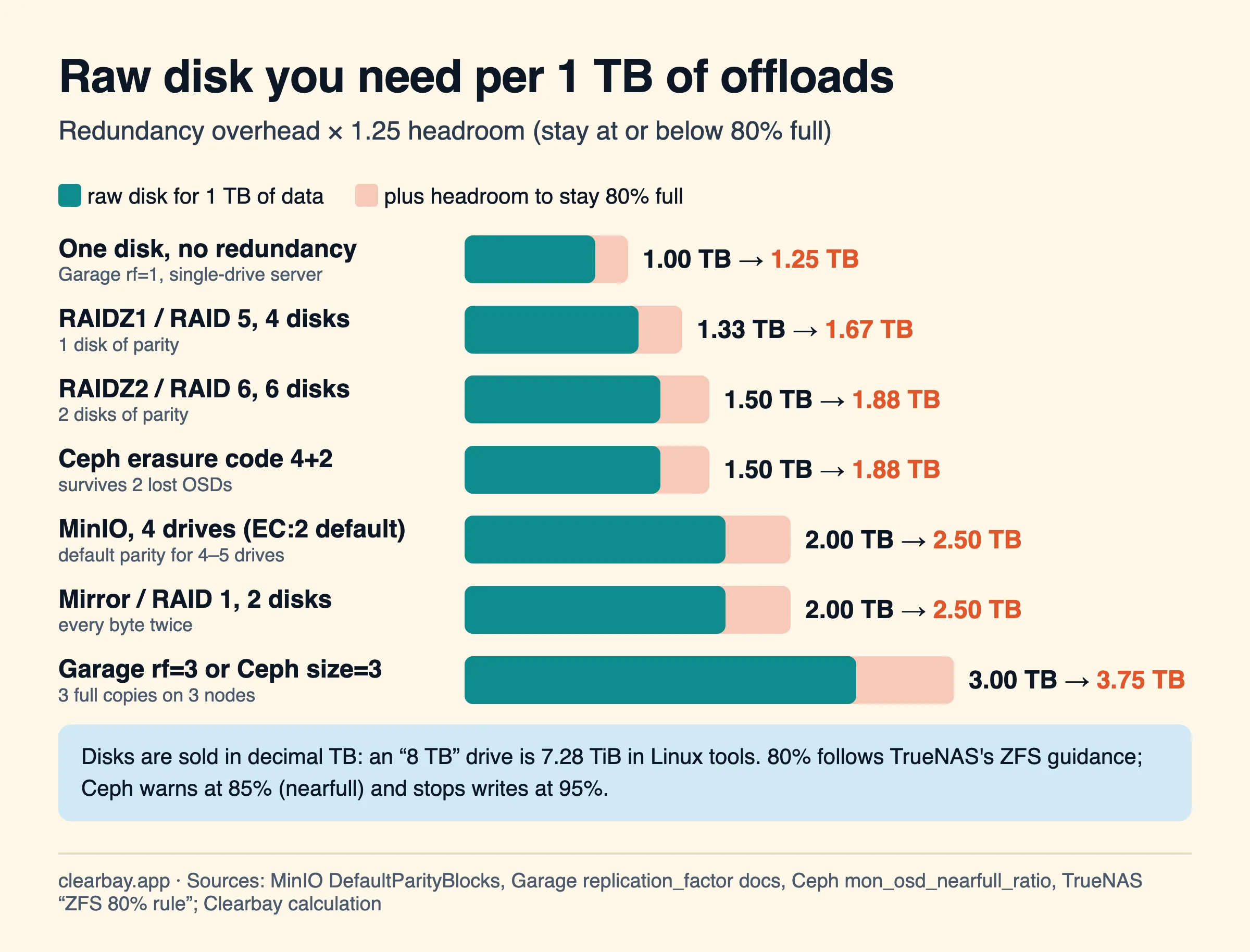
Worked examples with 8 TB drives, before filesystem metadata:
| Setup | Usable | Offloads at 80% full | Survives |
|---|---|---|---|
| 2 × 8 TB mirror | 8 TB | 6.4 TB | 1 failed disk |
| 4 × 8 TB RAIDZ1 | 24 TB | 19.2 TB | 1 failed disk |
| 6 × 8 TB RAIDZ2 | 32 TB | 25.6 TB | 2 failed disks |
| 4 × 8 TB MinIO (EC:2 default for 4–5 drives) | 16 TB | 12.8 TB | 2 failed drives |
3 nodes × 8 TB, Garage replication_factor = 3 | 8 TB | 6.4 TB | 2 failed nodes |
Drives are sold in decimal terabytes, while Linux tools often show binary units: an "8 TB" drive shows as 7.28 TiB. macOS Finder uses decimal units, so the numbers Clearbay shows for your items match the drive label. Redundancy isn't a backup. If the server is your only copy of something irreplaceable, keep a second copy elsewhere, for example on an external drive.
Troubleshooting
| What you see | Cause | Fix |
|---|---|---|
| "…App Transport Security policy requires the use of a secure connection" | Plain HTTP to an IP address or a dotted domain name. | Use http://name.local:port, or set up HTTPS. |
| A certificate error ("untrusted", "unknown root", "bad date") | Self-signed certificate not trusted, missing SAN, or validity over 825 days. | Re-create it with the command above and set it to Always Trust in Keychain Access. |
| "Couldn't reach the storage service" on the first try | The Local Network prompt was pending or denied. | Allow Clearbay in Privacy & Security → Local Network, then test again. |
| "The bucket is in region garage…" | Garage's region check. | Type garage, or your s3_region, in Region. |
| "The secret key doesn't match the access key" | A wrong secret, or a reverse proxy that rewrites the Host header or port, which breaks signatures. | Paste the secret again. Make the proxy pass the original Host header. |
| "The bucket or object wasn't found (404)" | Path-style turned off on a server without bucket subdomains, or the bucket name typed in the endpoint. | Turn Path-style on. The endpoint should end at the host and port. |
| "Your Mac's clock is off" | Clock skew on the Mac or the server. | Turn on automatic time on both machines (NTP on the server). |
How Clearbay works with your own server
Clearbay is a disk-space app for macOS 14 and later, on Apple silicon and Intel. Download it free from clearbay.app/download. The Custom preset is the same engine used for Amazon S3, R2, B2, Wasabi and MEGA S4. Each item streams as one tar archive in 16 MiB parts, three at a time, with no temporary copy on your disk. Clearbay checks the uploaded size and metadata, writes a manifest with a SHA-256 and the first 500 file names, and only then deletes the source. Restore is always free, and View contents works without downloading anything.
Each item can be up to 200 GB. Live tool caches that Clearbay rewires to another location need a local drive and can't go to any S3 server. Offloading to cloud storage, including your own server, is part of Pro. Adding and testing a server is free. If you'd rather not run a server at all, compare Backblaze B2, Wasabi and MEGA S4.
FAQ
Is MinIO still free and open source?
The MinIO community code is still AGPLv3, but the minio/minio repository is archived and no longer maintained, and it ships as source code only. MinIO now offers AIStor Free as its no-cost edition. Existing MinIO servers keep working with Clearbay. New setups are better served by an actively maintained server such as Garage or SeaweedFS.
What is the best MinIO alternative for a home server?
For a single machine or a small cluster, Garage (v2.5.0) and SeaweedFS (4.53) are both active and both in TrueNAS's community catalog. Garage is the simplest but has no versioning and no built-in TLS. SeaweedFS adds versioning and native TLS. Ceph RGW makes sense only if you already run Ceph.
What is the difference between path-style and virtual-hosted URLs?
Path-style puts the bucket in the path (https://nas.local:9000/clearbay/file). Virtual-hosted puts it in the hostname (https://clearbay.nas.example.com/file), which needs wildcard DNS and a wildcard certificate. Every server here supports path-style, and it needs no extra DNS or certificates, so keep Clearbay's checkbox on unless your server is set up for subdomains.
Can a Mac app connect to an S3 server over plain HTTP?
Only to .local names and dotless hostnames. Since macOS 14, App Transport Security blocks plain HTTP to IP addresses by default, and it always blocked HTTP to normal domain names. Use http://yournas.local:port on your home network, or HTTPS everywhere else.
What region should I use for Garage?
Whatever s3_region says in garage.toml. The official quick start uses garage. Garage rejects other regions with an AuthorizationHeaderMalformed error, which Clearbay turns into a message naming the expected region. Clearbay's Custom preset fills in us-east-1 when Region is empty, so type the Garage value yourself.
Do I need versioning on the bucket?
No, and it's better off. With versioning on, deleting a cloud copy in Clearbay leaves an older version behind that still uses disk. Clearbay's own safety comes from verifying each upload and keeping a manifest, not from bucket versions. Garage doesn't support versioning at all, so this only matters on MinIO, Ceph and SeaweedFS.
Sources
- minio/minio on GitHub: archive notice,
docs/minio-limits.md,docs/config(stale_uploads_expiry, MINIO_DOMAIN, site region),cmd/signature-v4-utils.go - Garage: S3 compatibility status, configuration reference, quick start and reverse proxy
- Ceph Object Gateway S3 API, RGW config reference, rgw.yaml.in option defaults
- SeaweedFS: Amazon S3 API, S3 credentials, S3 lifecycle
- TrueNAS apps: MinIO (Stable) removed 2026-07-09; Garage, SeaweedFS, RustFS community apps
- QNAP QuObjects
- Apple: NSAllowsLocalNetworking (ATS and IP addresses on macOS 14)
- Apple: Requirements for trusted certificates in iOS 13 and macOS 10.15
- Apple TN3179: Understanding local network privacy
- TrueNAS: The ZFS 80% rule