Mac cleaner for developers that knows your toolchain
Builds, package installs and local models quietly eat tens of gigabytes. Code Dust shows which of it you can let go of, and which you'd rather park on a drive.
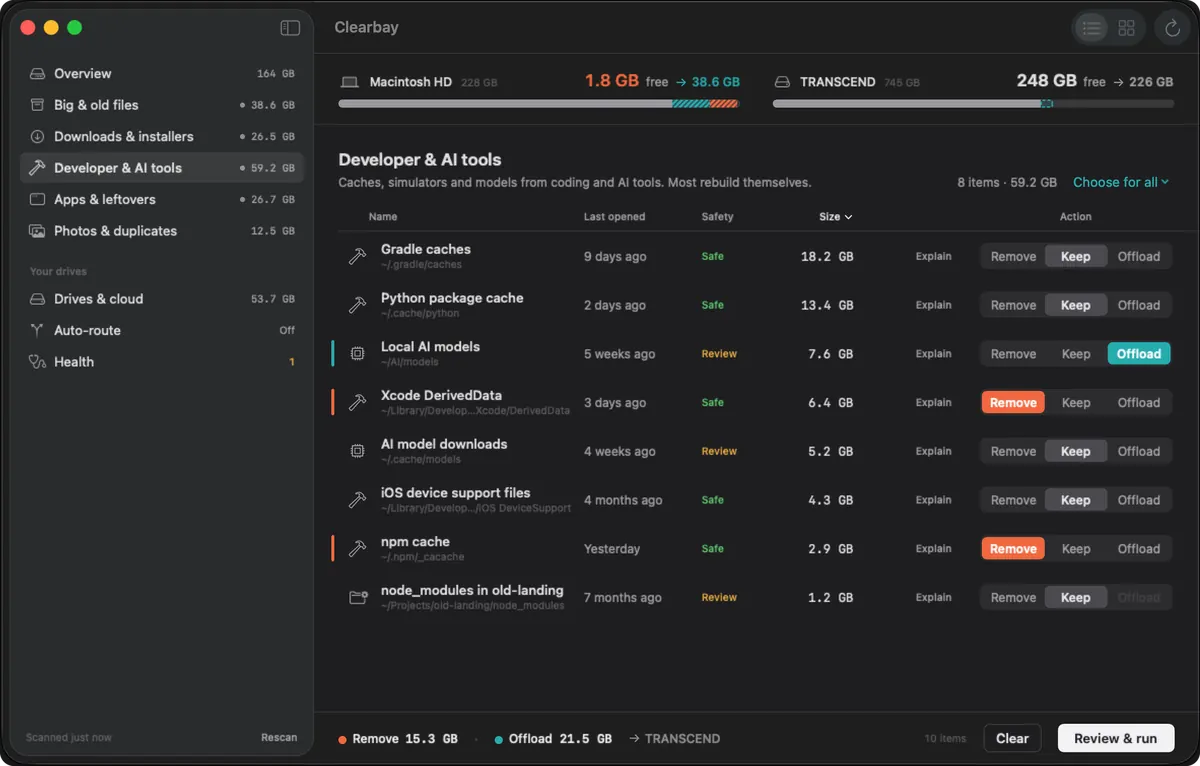
Short answer: Clearbay's Code Dust section lists what Xcode, package managers and AI tools leave on your Mac, from DerivedData and simulators to stale node_modules, Gradle, npm, uv and Hugging Face caches. Every item gets a Safe, Review or Caution label from built-in rules. Remove what rebuilds itself, or offload big caches to a drive and Clearbay points the tool at the new folder.
- Free download
- macOS 14 or later
- Apple silicon & Intel
Why a developer Mac fills up faster than any other
A general-purpose cleaner sees ~/Library/Developer as one big grey folder. In practice it's a dozen different things with different rules: a build index Xcode rebuilds in a minute, an archive holding the only dSYM for an app version still in the App Store, a simulator runtime that takes a long download to get back. The same split runs through every ecosystem you touch. A global npm cache is disposable; a node_modules folder in the project you're shipping today is not.
So the question is never just "how big is it". It's "who made it, does it come back on its own, and am I still using it". Code Dust answers those three per item, so you can clear gigabytes without breaking tomorrow morning's build.
What Code Dust finds, tool by tool
Labels come from Clearbay's rule book, not from guesses. Safe means the tool recreates it; Review means it comes back, but slowly or at a cost; Caution means it can hold work that exists nowhere else.
| Toolchain | What it looks at | Label | Your options |
|---|---|---|---|
| Xcode | DerivedData, Xcode caches, iOS / watchOS / tvOS DeviceSupport, device logs, SwiftPM cache | Safe | Remove, or offload DerivedData |
| Xcode archives | Release builds with their dSYMs | Review | Keep, or offload old versions |
| Simulators | Simulator devices, runtimes, CoreSimulator caches and logs | Review / Safe | xcrun simctl delete unavailable for dead devices |
| JavaScript | npm, Yarn, pnpm and Bun caches; node_modules, .next, dist in inactive projects | Safe / Review | Remove; offload the npm or Yarn cache |
| Python | pip and uv caches, conda / Miniforge package folders, .venv in inactive projects | Safe / Review | uv cache clean; offload pip, uv or conda caches |
| JVM & Android | Gradle caches, wrappers and daemons, Maven repository, Android system images, emulators and build cache | Safe / Review | Remove; offload Gradle as a whole |
| Mobile & native | CocoaPods repos and cache, Flutter pub cache, Rust registry and target, Go module and build caches, Homebrew downloads | Safe / Review | brew cleanup -s, go clean; offload CocoaPods or pub |
| Editors & AI tools | Claude desktop VM bundles and caches, Cursor, VS Code, Windsurf and JetBrains caches, Playwright and Puppeteer browsers | Safe | Remove; offload the Claude VM bundles |
| Your AI history & models | Claude Code project history, Codex sessions, Ollama models, Hugging Face cache, LM Studio models | Review | Remove or offload; Ollama and Hugging Face get rewired |
| Docker Desktop | Docker's virtual disk | Caution | Reported only; prune with Docker's own tools |
With optional Full Disk Access, the scan also reaches the system-wide simulator caches and images in /Library/Developer/CoreSimulator. Want the reasoning behind each verdict and the manual commands? Our guide on which developer caches are safe to clear goes folder by folder.
How it works
- Scan your MacClearbay measures sizes and dates of known tool locations and walks your project folders (Projects, Developer, Documents and Desktop). It never reads your source files.
- Spot inactive projectsA folder counts as a project when it holds a marker such as
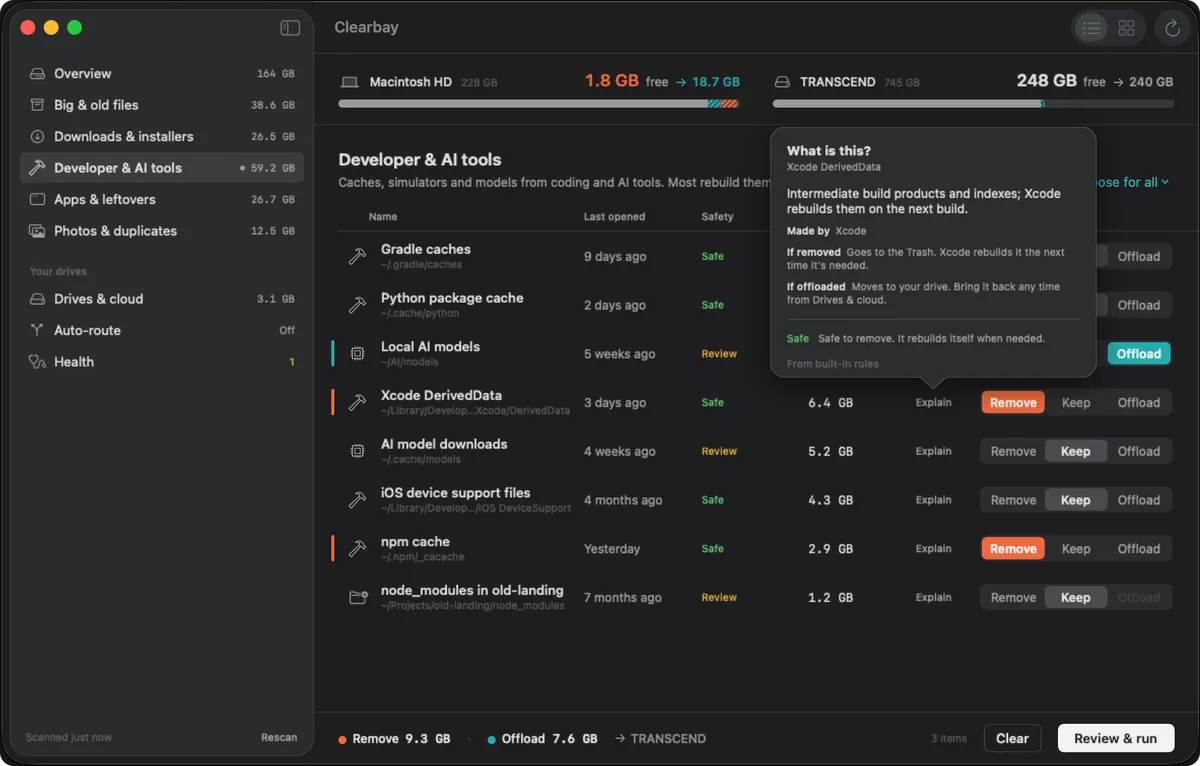
package.json,Cargo.toml,pyproject.toml,Package.swift,build.gradle, an.xcodeprojor.git. Its build and dependency folders are offered only if nothing else in the project changed for 7 days. - Read the label, ask if unsureClick Explain on any row for the tool that made it, whether it comes back by itself, and what Remove and Offload would each do to it.
- Pick an action per rowKeep is the default. Choose Remove for disposable caches and Offload for big ones you want back later, like model folders or an old Xcode archive.
- Review the plan, then run itOne screen shows totals per action. Where a tool has its own cleanup command, Clearbay runs that instead of deleting files by hand.
Native cleanup commands instead of blind deletes
Some tools keep an index of what they store. Deleting their folders behind their back can leave that index pointing at files that no longer exist. For those, Clearbay calls the tool itself and lets it decide what's unused:
xcrun simctl delete unavailableremoves simulator devices whose runtime is gone and leaves bootable ones alone.brew cleanup -sclears Homebrew's download cache, including the latest versions' downloads.uv cache cleanempties uv's cache through uv, so it stays consistent.go clean -modcacheandgo clean -cacheclear Go's module and build caches; the module cache is read-only on disk, so a plain delete often fails anyway.
Docker is the one place Clearbay deliberately doesn't touch. Its virtual disk can hold database volumes, so Code Dust reports the size and leaves pruning to Docker.
Offload a cache and keep the tool working
Deleting a 20 GB Gradle cache frees space today and costs you a long re-download tomorrow. Offloading moves it to your external drive instead, and then tells the tool where it went. Clearbay writes the new location into a clearly marked block in ~/.zshrc and mirrors it with launchctl setenv, so Terminal sessions and apps opened from the Dock both pick it up.
| Tool | Setting Clearbay changes |
|---|---|
| Gradle | GRADLE_USER_HOME |
| npm / Yarn | npm_config_cache, YARN_CACHE_FOLDER |
| pip / uv / conda | PIP_CACHE_DIR, UV_CACHE_DIR, CONDA_PKGS_DIRS |
| CocoaPods / Flutter | CP_REPOS_DIR, PUB_CACHE |
| Hugging Face / Ollama | HF_HOME, OLLAMA_MODELS |
| Xcode | DerivedData location in Xcode's own settings |
Restore brings the folder back, removes the export and resets Xcode's setting. If the tool already rebuilt a fresh cache in the old place meanwhile, Clearbay renames that copy aside instead of deleting it. Rewired caches stay on a local drive: they're refused for cloud destinations, because a build can't wait on an upload. For the drive side of things, from verification to Auto-Dock, see how offloading Mac storage works.
Rewired tools read from the drive, so run those builds while it's connected, or restore the cache before a trip.
AI tools: models, VM bundles and chat history
Local AI adds a new kind of developer clutter. Model files are huge but expensive to fetch again, so Code Dust labels them Review and suggests offloading over deleting. The Claude desktop app's VM bundles and the caches of Cursor, VS Code and Windsurf rebuild on their own and are labelled Safe. Claude Code project history and Codex sessions are labelled Review, because removing them means you can't resume those sessions.
For how big typical models are and where each tool stores them, read local AI model sizes and locations on a Mac. If the same model weights sit in two tools at once, Lookalikes finds duplicate model files.
Free or Pro for developer cleanup?
| Task | Free | Pro |
|---|---|---|
| See every developer and AI-tool item with its label | Yes | Yes |
| Remove items labelled Safe | Yes | Yes |
Remove items labelled Review (stale node_modules, models, archives) | No | Yes |
| Offload a cache to a drive, with rewiring | One folder up to 5 GB | Unlimited |
| Scheduled cleanup of rebuildable caches | No | Yes |
Developer cleanup questions
Is it safe to delete DerivedData?
Yes, as long as Xcode isn't building at that moment. DerivedData holds intermediate build products and indexes, and Xcode recreates them per project. You pay for it with one slow build and some indexing time, so clear it when you're switching tasks, not five minutes before a demo.
Why is Xcode taking up so much space?
Rarely because of Xcode.app itself. The weight sits in simulator runtimes, symbol folders for every device OS version you've ever connected, old archives and DerivedData from projects you no longer open. Code Dust lists each of these separately, so you can see which one actually grew.
How do I clean up old Xcode simulators?
Devices whose runtime was removed can go with xcrun simctl delete unavailable, which Clearbay runs for you. Runtimes you no longer test on are removed in Xcode's Components settings. Devices you still boot are labelled Review, because they can hold test data you set up by hand.
Can I delete node_modules folders?
In projects you aren't working on, yes: running your package manager's install brings them back from the lockfile. Clearbay only offers node_modules from projects where nothing changed for a week, and it leaves .git folders alone.
Will Clearbay delete my Docker images?
No. Docker Desktop keeps images, containers and volumes inside one virtual disk, and volumes can hold data you can't download again. Clearbay shows how big that disk is and leaves the cleanup to Docker's own prune commands or its settings.
Does my code leave my Mac during the scan?
No. Clearbay looks only at file names, sizes and dates; it never opens a file to read what is inside. On Macs with Apple Intelligence, Explain runs on-device; everywhere else it uses built-in rules.
Reclaim your build disk in one pass
Scan for free and see every cache, simulator and stale project folder with its label. Pro adds unlimited offloading with tool rewiring, Review items and scheduled cache cleanup, for one payment.
Related
Clearbay is made by Bisai Technologies, LLC · Mac storage guides · Changelog · Support · Privacy · Terms · Refunds