Feature reference
Every Clearbay feature, section by section
Short answer: Clearbay is a single Mac app for disk space. It measures what is on your disk, explains each item, and gives you three moves per item: Remove, Keep or Offload to a drive or the cloud. The sections below follow the app’s own sidebar, from the first scan to updates, and each one links to the page that covers it in full.
- One app, free download
- macOS 14 or later
- Pro is one payment
Jump to a section
Analyze · Free
Bay Scan & Space Atlas
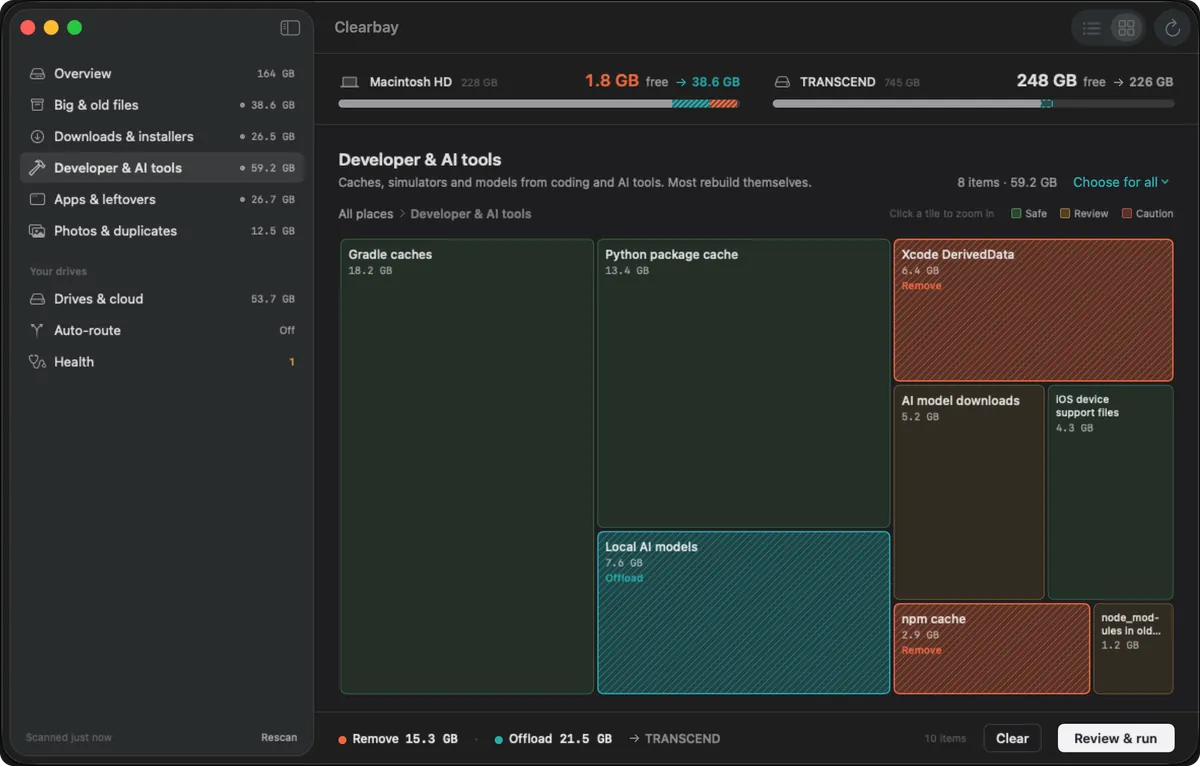
Bay Scan is where every session starts. It walks your home folder, your apps and their caches once, then groups what it measured into named places with a total and an item count, so the sidebar already tells you where the gigabytes went. Space Atlas draws the same data as a map of tiles sized by space, which you can zoom into folder by folder.
- A single pass over your files, apps and caches; with Full Disk Access, the entire startup disk
- Results filed into plain-language places instead of a raw folder tree
- A Safe, Review or Caution label on every row, taken from Clearbay’s built-in rules
- An Overview of used, free and purgeable space, with the grey “System Data” bar put into words
- Tiles for any folder or external volume; set Remove or Offload directly on a tile
- Space bar for a Quick Look preview, and Peek to list a folder’s 30 largest children without opening Finder
Analyze · Free
Forgotten Giants
Big files are only a problem when nobody uses them. Forgotten Giants ranks your largest files and shows the last-opened date next to each, so a video you edit every day and a disk image untouched for a year no longer look alike. Each row has the same Remove, Keep or Offload choice as the rest of the app.
- Largest files first, with size and last-opened date on every row
- Large-and-untouched items stand out without any filter setup
- With Full Disk Access, also searches
/Users/Shared,/Library/Application Supportand/opt - Explain and Quick Look on each file before you decide
Analyze · Free
Download Drift
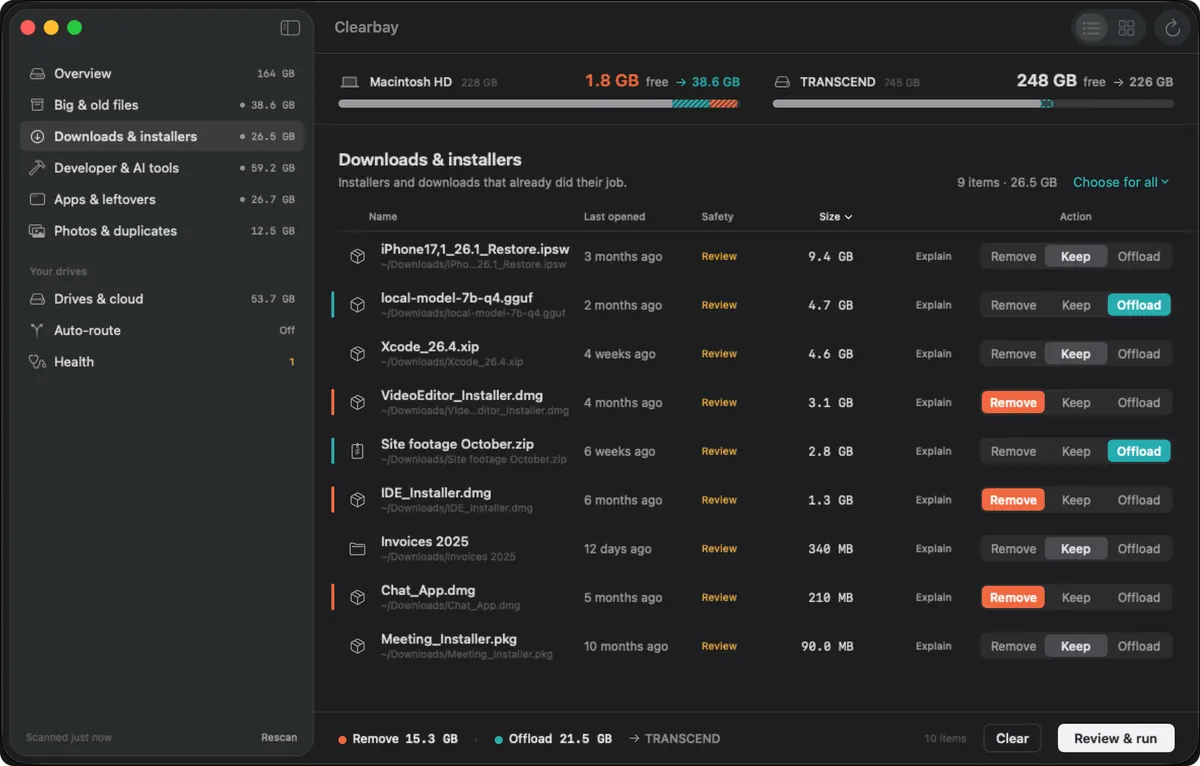
Your Downloads folder keeps everything you ever fetched, including installers you ran once. Download Drift sorts it by age and by kind of file and pulls the finished installers into their own group, which is often the quickest space you will win back.
- Downloads grouped by how old they are and by file type
- Leftover
.dmg,.pkg,.xipand.zipinstallers collected in one list - iPhone and iPad restore images and old archives flagged
- Screenshots and screen recordings that pile up on the Desktop
Clean · Safe items free, the rest Pro
Code Dust
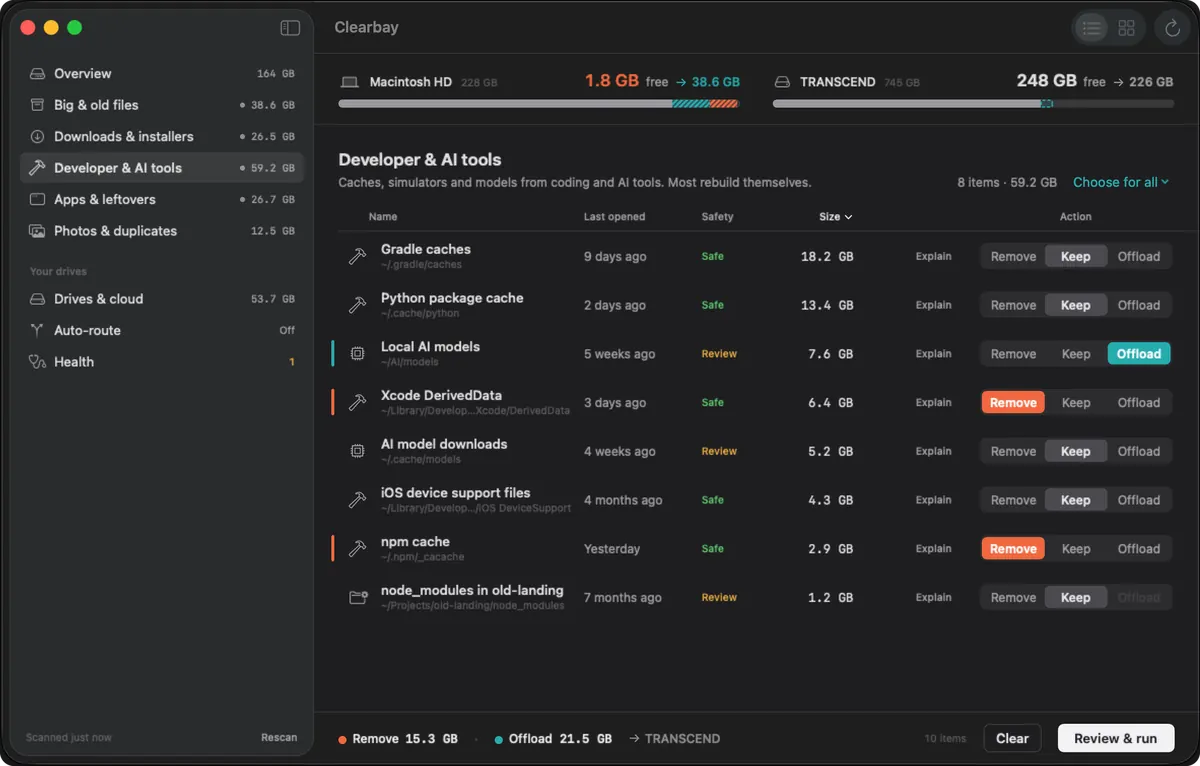
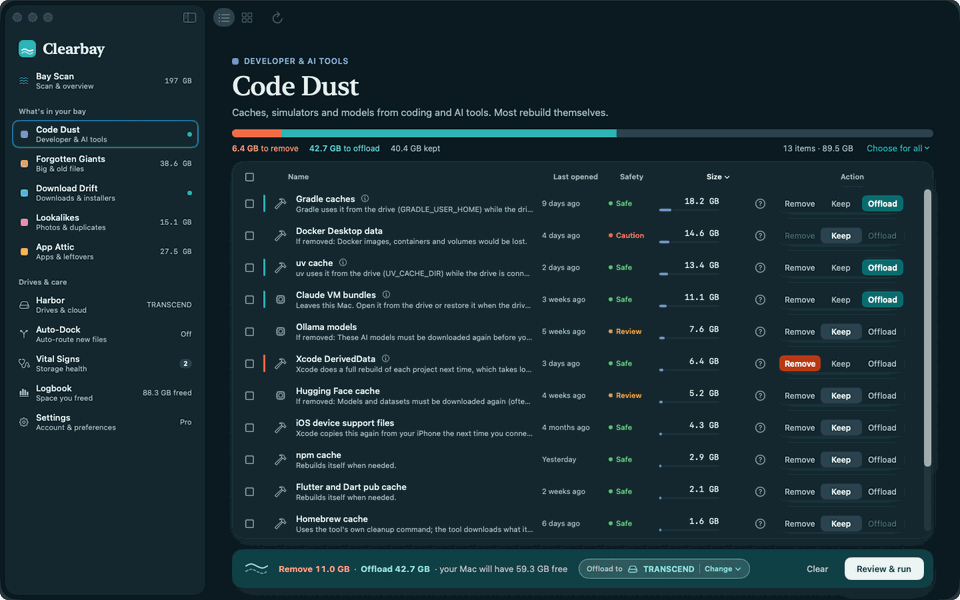
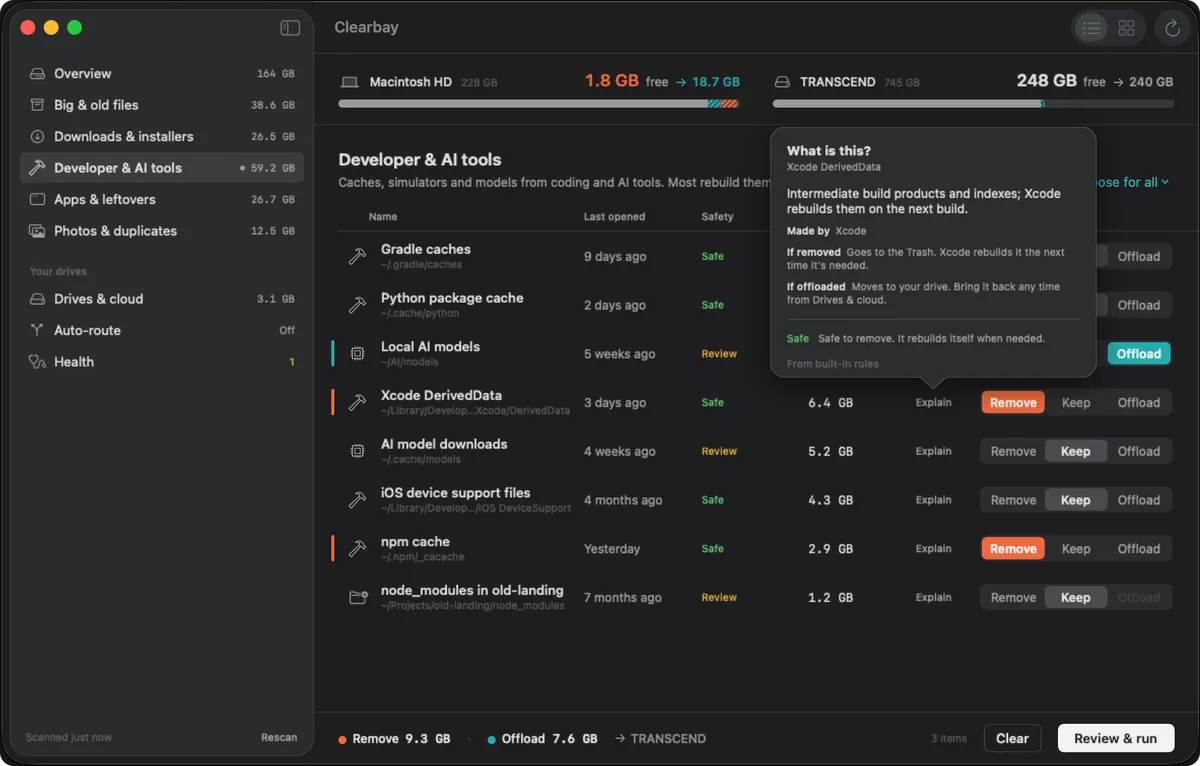
Code Dust is the developer section. It knows where Xcode, package managers and AI tools keep build output and downloaded packages, labels what the tool will simply fetch or build again, and uses the tool’s own cleanup command where one exists instead of deleting folders behind its back.
- Xcode: DerivedData, Archives, device support files, simulators and runtimes
- Package caches: npm, yarn, pnpm, uv, pip, CocoaPods, Flutter, Gradle, Homebrew and Rust build targets; Docker is measured but left alone
node_modulesand build folders inside projects nobody has touched for at least 7 days- AI tooling: caches from Claude, Codex, Cursor and VS Code, and model folders for Ollama, Hugging Face and LM Studio
- Native commands such as
xcrun simctl delete unavailableandbrew cleanup
Everyday caches, too
Outside development the same cleanup covers app caches and logs, crash reports, browser caches for Safari, Chrome, Firefox, Arc and Brave, media saved by WhatsApp, Telegram, Slack and Teams, Mail’s downloaded attachments and the Trash of every connected drive. Pro can repeat the cleanup of self-rebuilding caches on a schedule.
In depth: the Mac cleaner for developers → · Which developer caches are safe to clear
Apps · Measuring free, uninstalling Pro
App Attic
App Attic lists every app with what it really costs in space: the bundle plus the data it keeps in your Library. From there it uninstalls apps completely, including the parts installed for all users, and finds data left by apps you already threw away.
- Each app with its last-opened date and three sizes: app, data and total
- Complete uninstall of the app with its Library folders, containers and saved state
- Quit & Uninstall for apps that are still running
- Admin-installed apps, launch daemons, helper tools and package receipts in one password step
- Drag an app from Finder onto App Attic to start an uninstall
- Orphaned data from apps that are already gone, always labelled Review
- Login items and launch agents with their signature status; turn them off or remove them
Duplicates · Pro
Lookalikes
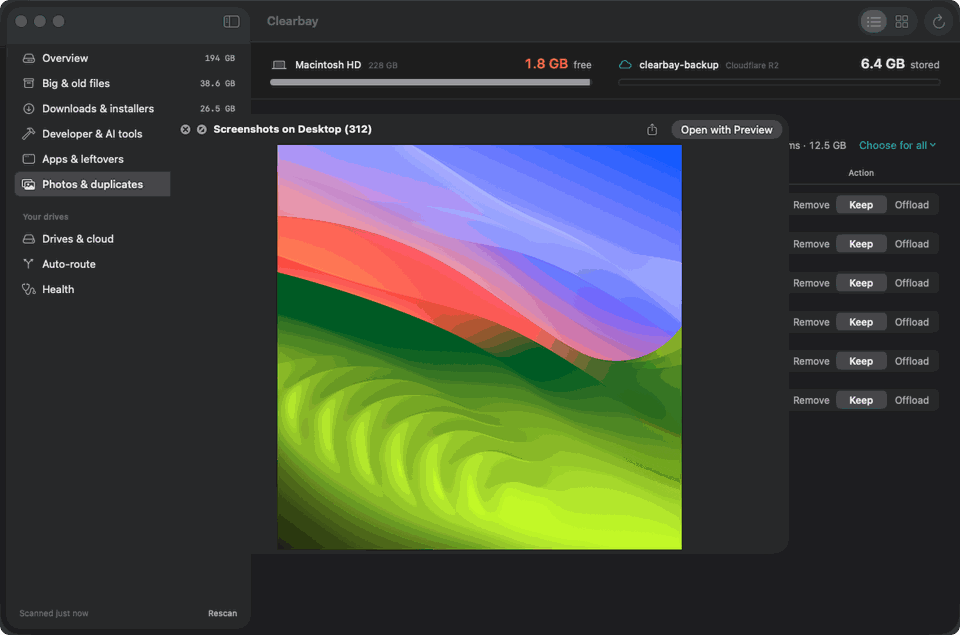
Lookalikes finds files that repeat. Exact copies are confirmed byte for byte before they are called duplicates; looser matches, such as a burst of near-identical photos, are grouped for you to judge. One copy per group is suggested to keep.
- Exact duplicates confirmed in three passes: file size, a partial hash, and finally a complete SHA-256
- Photo series and bursts grouped by visual similarity, best shot suggested
- Files with the same name in different folders
- Repeated or orphaned AI model weights such as
.gguf,.safetensorsand.mlx
Offload · One folder free, unlimited with Pro
Harbor & Offload
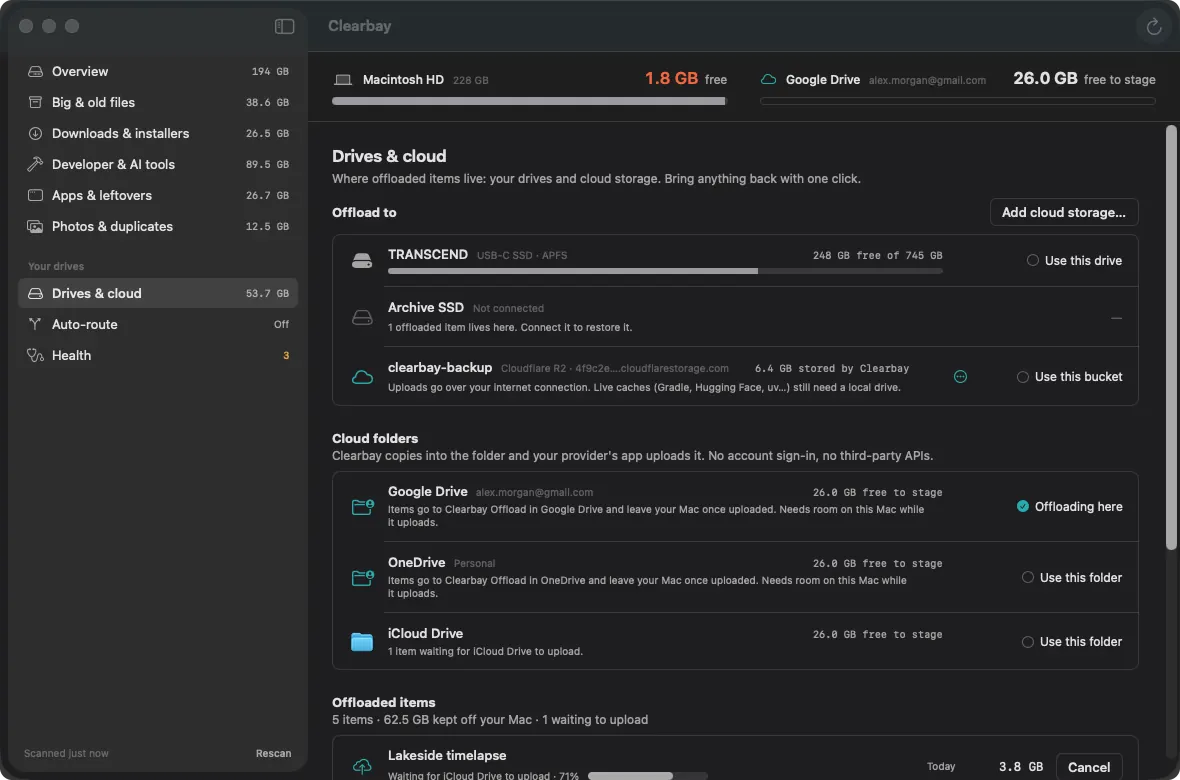
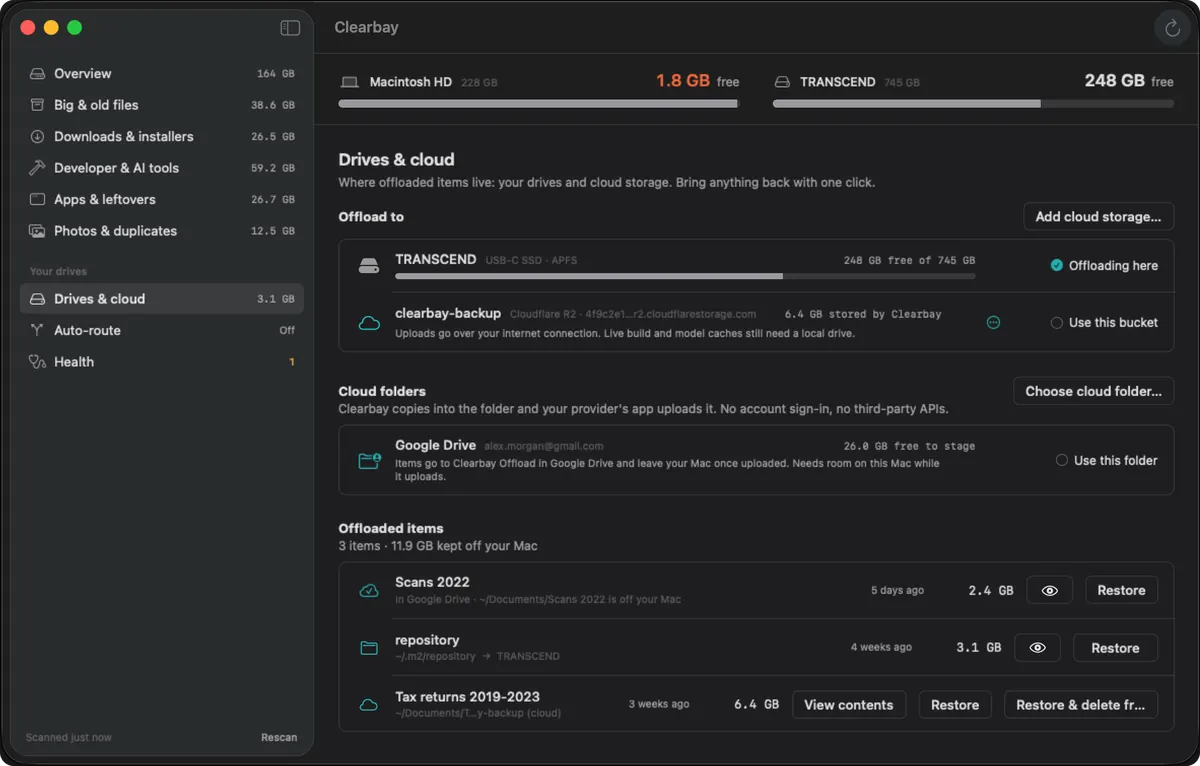
Offload is the move that sets Clearbay apart: an item leaves the internal disk for storage you own, and Clearbay remembers exactly where it went. Harbor is the screen for that. It holds your destinations, the items stored on each, and a Restore button for every one of them.
- Destinations: external drives, cloud folders and S3-compatible buckets, mixed freely
- Cloud folders detected for iCloud Drive, Google Drive, OneDrive, Dropbox and Box, with no extra sign-in
- S3-compatible buckets, including Cloudflare R2, Amazon S3, Wasabi, Backblaze B2, MEGA S4, MinIO or your own endpoint, with keys kept in the Keychain
- Every copy checked on the destination before the original is removed
- Rewiring for caches that tools still use (
HF_HOME,GRADLE_USER_HOME,OLLAMA_MODELS, DerivedData, CocoaPods, npm, pub and uv), so each tool finds them on the drive - Items on an unplugged drive stay listed and restore once it is back
Automation · Pro
Auto-Dock
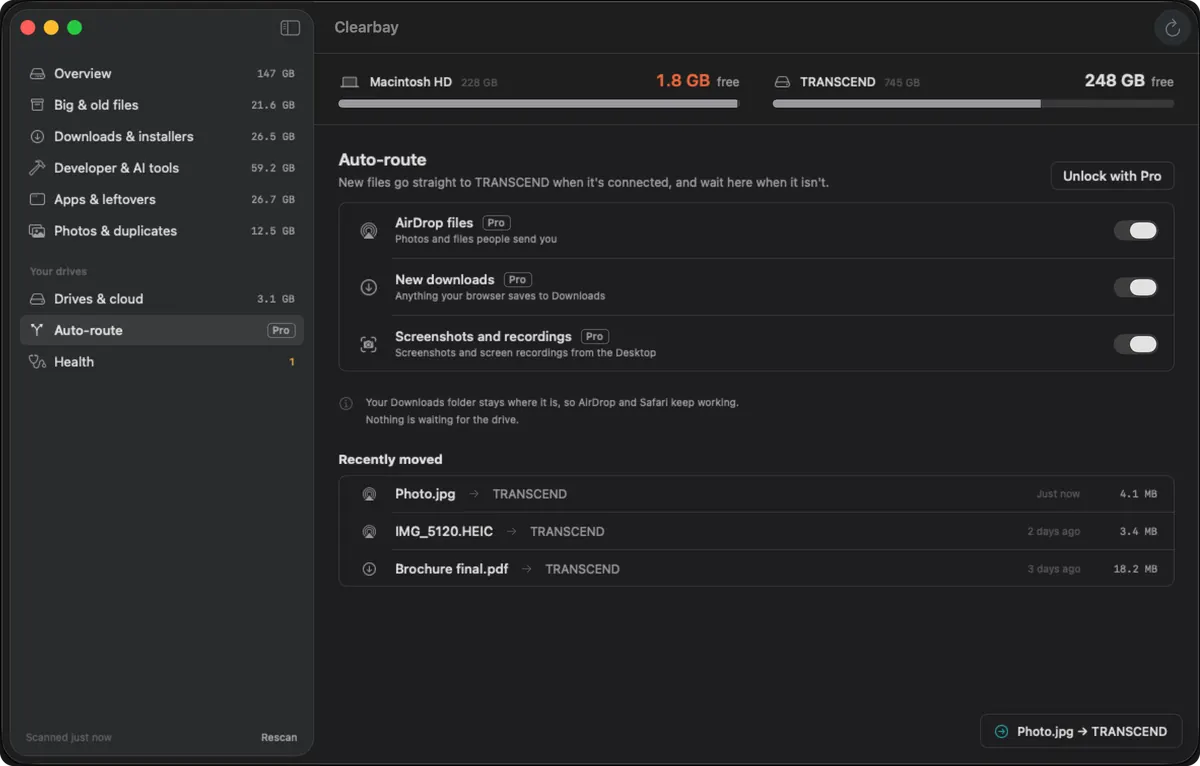
Auto-Dock handles new arrivals so the same clutter doesn’t build up again. While your drive is connected, files that land in the usual places are moved to it as they arrive; a small notice tells you what moved.
- Three switches: AirDrop transfers, browser downloads, and screenshots with screen recordings
- No drive attached? New files queue on the Mac and follow later
- Downloads remains an ordinary folder, never a link, so AirDrop is unaffected
Disk health · Free, alert Pro
Vital Signs
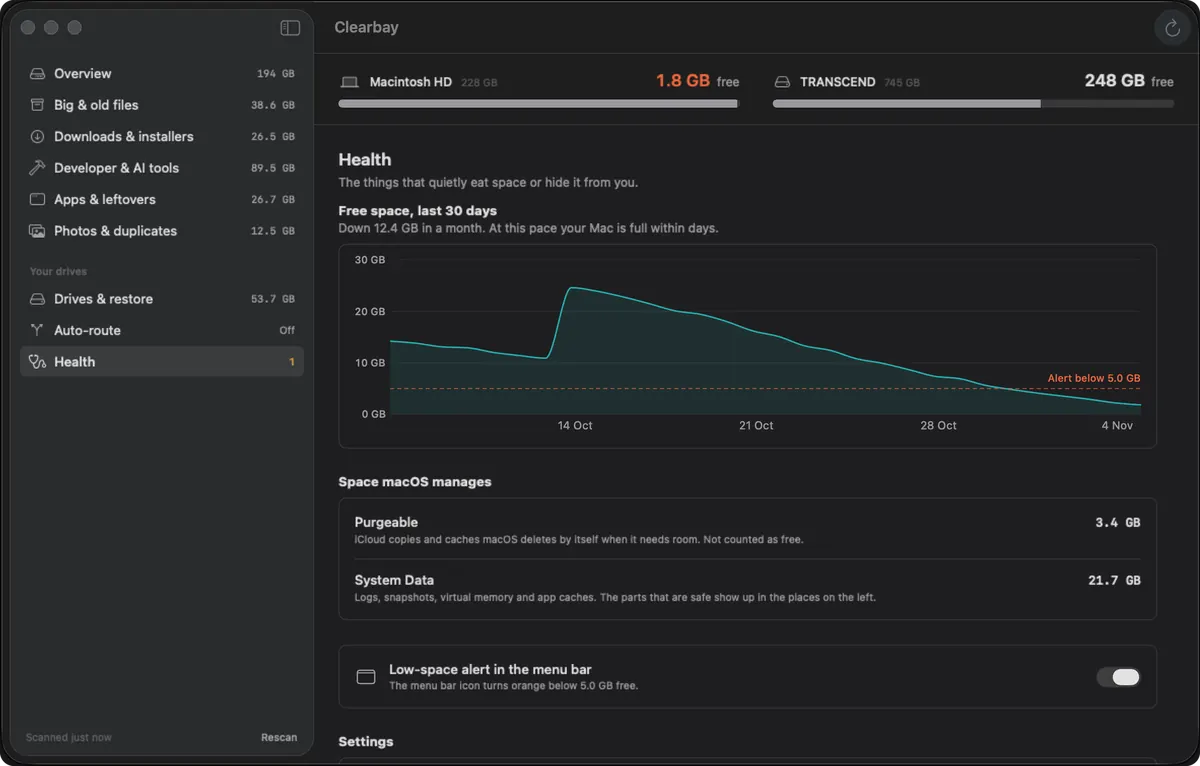
Vital Signs watches the disk over time instead of at one moment. It samples free space every day, breaks the whole disk into understandable parts, and warns you from the menu bar before space runs out rather than after.
- A daily free-space chart, so a sudden drop is easy to date
- “Where your space goes”: the Data volume split into you, other users, apps, system libraries, macOS, snapshots and purgeable space (needs Full Disk Access)
- System Data decoded into named parts, each one clickable into Space Atlas
- Local Time Machine snapshots listed, with the option to thin them
- A menu-bar warning when free space falls under your limit, 5 GB unless you change it (Pro)
- A Full Disk Access status check with a button that opens the right settings page
History · Free
Logbook, Restore & Undo
Every plan Clearbay runs is recorded in a journal on your Mac. That record is what lets you reverse a run, find an item you offloaded months ago, or check what a scheduled cleanup did while you weren’t looking. None of this is behind Pro.
- Undo last run reverses the latest plan in one click
- Restore brings back a single offloaded item to the path it came from
- A rebuilt cache found at that path is renamed aside, never overwritten
- Caches that were deleted for good are shown as such and skipped by Undo
- The full history of runs, item by item, with source and destination
AI · Optional
On-device AI
Clearbay uses Apple’s on-device model to explain items in plain language and to turn a goal you type into a draft plan. It runs entirely on the Mac and never sets a safety label. On Macs without Apple Intelligence, built-in rules provide the same features in a simpler form.
- Explain on any row: what the item is, which app created it, and what Remove or Offload would change
- AI cleanup plan (Pro): describe a target such as “20 GB, leave my photos alone” and review the draft it fills in
- Drafts only use items the rules already allow, and paths that aren’t in your scan are discarded
- Requires macOS 26 with Apple Intelligence; can be switched off in Settings
Privacy & safety · Always on
Privacy & safety
The safety model is simple to state: rules decide what may be touched, you decide what is touched, and Clearbay keeps a way back. On the privacy side, the app looks at file metadata only and has no account system for the free version.
- Only names, sizes and dates are read; file contents are never opened or uploaded
- No sign-up to use the app, no ads, no analytics
- Keep is preselected everywhere; a plan runs only when you press Run
- Protected locations such as system folders, Keychains, Mail, Messages, Photos libraries, iCloud Drive storage and
.gitfolders are off-limits - Full Disk Access is your choice, and can be withdrawn at any time
Updates & uninstall
Updates & uninstall
Clearbay is distributed directly from this site as a signed, notarized disk image, so it also updates itself from here. Leaving is as tidy as arriving: a built-in uninstaller removes the app and the data it kept.
- A daily check for a new version, plus Check for Updates on demand
- Release notes in the app and on the public changelog
- Interface in English, German, French, Spanish, Italian, Portuguese (Brazil), Japanese, Korean and Simplified Chinese, following your Mac’s language
- Settings → Uninstall Clearbay removes the app and everything it stored; items you offloaded stay on their destination
Which features need Pro?
All of the analysis, Explain, removing Safe items, offloading one folder of up to 5 GB, and every way of getting things back work in the free download. Pro is a single purchase that lifts the offload limit and opens the uninstaller, Lookalikes, Auto-Dock, Review items and the AI plan. The row-by-row breakdown lives on one page so it stays accurate.
Questions about Clearbay’s features
Are all these features in the free download?
Yes. There is one app. Features that need Pro are visible in the free version and show a small Pro label; buying Pro unlocks them in place without a second download.
Which features work without Full Disk Access?
All of them. Without Full Disk Access Clearbay scans what your user account can open; with it, the scan adds other apps' containers, system-wide caches and logs, the whole-disk breakdown in Vital Signs and system leftovers for the uninstaller.
Does Clearbay include a malware scanner or a RAM cleaner?
No. Clearbay is about storage only. It has no virus scanning, memory freeing or speed-up tools, and it doesn't update your other apps.
Can Clearbay clean up an external drive?
Partly. Space Atlas maps any connected volume, and the Trash on every drive is included in the cleanup. Anything removed from another volume goes to that drive's Trash rather than being deleted outright.
Try every feature on your own Mac
The free download scans, explains and cleans Safe items with no time limit. Unlock the rest with one payment when you need it.
Related
Clearbay is made by Bisai Technologies, LLC · Mac storage guides · Changelog · Support · Privacy · Terms · Refunds