Clearbay vs CleanMyMac: two answers to a full Mac
Both apps find what fills your disk. They disagree on what to do next: CleanMyMac is a wide maintenance suite, Clearbay is a storage tool built around moving files instead of deleting them.
Short answer: CleanMyMac by MacPaw bundles cleanup, malware removal, performance tasks, an app updater and cloud and email cleanup in one subscription or one-time licence. Clearbay focuses on disk space and adds Offload: move any item to a drive, cloud folder or S3 bucket, checked before the original goes and restorable with one click. Want protection and maintenance in one app? CleanMyMac. Want to keep big files instead of deleting them? Clearbay.
We make Clearbay, so read this with that in mind. Every CleanMyMac fact below comes from MacPaw's own website, checked on 14 November 2026 and linked under Sources. Features and prices change; check MacPaw's pages before you buy.
Clearbay and CleanMyMac at a glance
| Area | CleanMyMac | Clearbay |
|---|---|---|
| Main idea | Smart Care runs five routines in one scan: cleanup, threat scan, performance, software updates and clutter [1] | A scan followed by a per-item choice of Remove, Keep or Offload, reviewed as one plan |
| Move files off the Mac and restore them | Cloud Cleanup can unsync files so they stay online-only in iCloud Drive, Google Drive, OneDrive or Dropbox [4]. We found no copy-to-external-drive feature on MacPaw's pages. | Offload to external drives, five cloud folders and S3 buckets, verified before the original is removed; one-click Restore (Pro beyond one 5 GB folder) |
| What happens on delete | Large & Old Files are deleted permanently, bypassing the Trash [5] | Files go to the Trash; only caches and logs that rebuild are deleted at once (can be turned off) |
| Malware protection | Yes: Moonlock Engine for malware removal, real-time monitoring and background scans [6] | No malware scanner |
| Performance & maintenance | Free up RAM, flush DNS, reindex Spotlight, run periodic scripts, thin Time Machine snapshots, free purgeable space [3] | Thin Time Machine local snapshots, free-space history; no RAM or DNS tools |
| Apps | Uninstaller with leftovers, plus an updater for many apps [3] [7] | Uninstaller with leftovers, including admin-installed apps and their system files (Pro); no app updater |
| Duplicates & large files | Duplicates, similar images, large and old files, downloads [3] | Same, plus duplicate AI model weights (Lookalikes is Pro) |
| Developer & AI tools | Xcode junk; AI Clutter for AI-tool caches and Ollama / LM Studio models [8] | Code Dust for Xcode, JavaScript, Python, JVM, Rust, Go and Homebrew plus AI tools, with native commands and tool rewiring |
| Cloud, email, browser | Cloud Cleanup inside your cloud accounts, Email Cleanup, Browser Care for Chrome tabs [2] | Cloud folders as offload destinations only; no email or browser-tab tools |
| On-device AI | Smart Insights, on macOS Tahoe 26 with Apple Intelligence [8] | Explain and AI cleanup plan, on macOS 26 with Apple Intelligence; built-in rules elsewhere |
| Where to get it | MacPaw Store, Mac App Store, Setapp [9] | clearbay.app only, signed and notarized |
| System requirements | macOS 11 or later, 320 MB [1] | macOS 14 or later, Apple silicon and Intel |
The real difference: deleting versus offloading
Most cleaners, CleanMyMac included, answer "my disk is full" with a removal list: system junk, large files, duplicates, unused apps. That works well for things nobody needs. It works less well for the stuff that actually fills a modern Mac, like a wrapped-up video project, a year of RAW photos or a 7 GB local model. Those aren't junk. You just don't need them on the internal SSD this month.
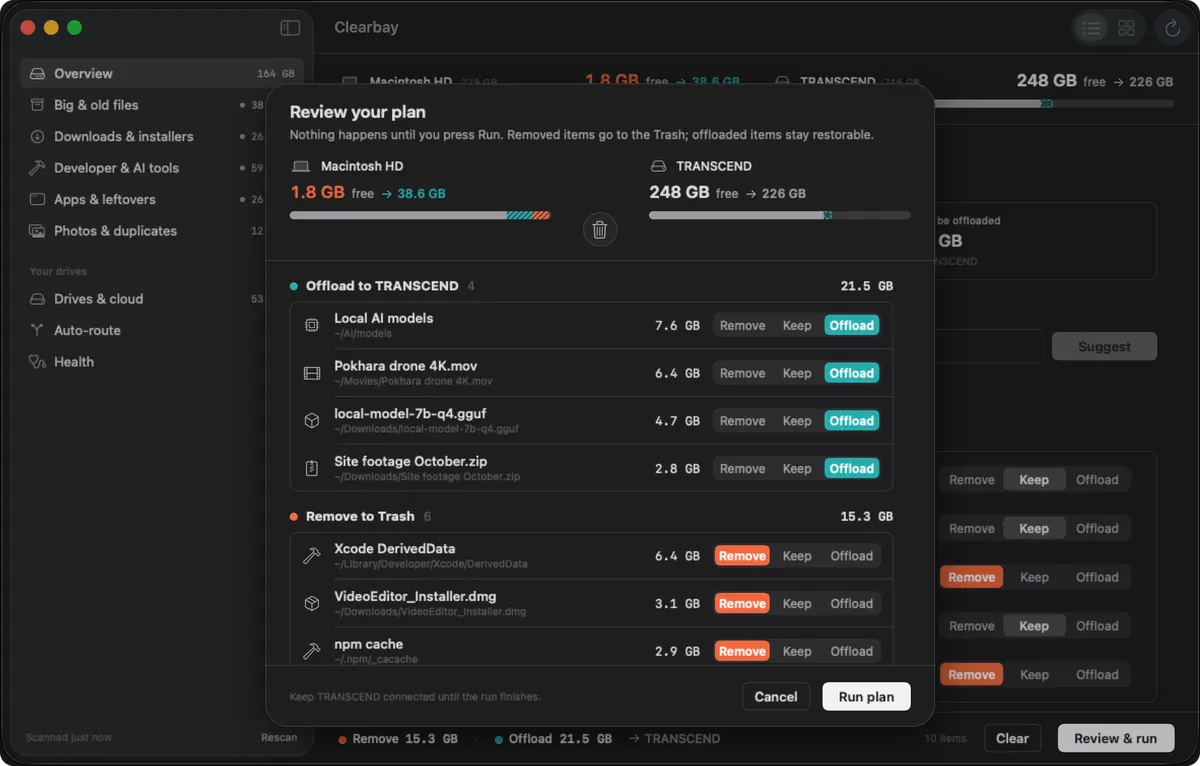
Clearbay puts a third button next to Remove and Keep. Offload copies the item to a drive or the cloud, checks the copy, frees the space and keeps a Restore button for it. The full mechanics, including cloud folders and buckets, are on the page about offloading Mac storage.
Where CleanMyMac is stronger
If you want one app that looks after the whole Mac, CleanMyMac covers ground Clearbay deliberately doesn't:
- Malware protection. CleanMyMac scans for and removes malware with MacPaw's Moonlock Engine, including real-time monitoring. MacPaw reports a 99% detection rate in an AV-TEST check [6]. Clearbay has no malware scanner at all.
- Maintenance tasks. RAM, DNS, Spotlight reindexing and macOS periodic scripts are one click in CleanMyMac. Clearbay sticks to storage.
- Keeping apps up to date. CleanMyMac's updater installs updates for many apps from one list. Clearbay doesn't update other apps.
- Inside your cloud and inbox. Cloud Cleanup scans what's stored in your cloud accounts, and Email Cleanup sorts mailbox clutter. Clearbay never signs in to your accounts.
- More Macs and more places to buy. CleanMyMac runs on macOS 11 and later and is sold by MacPaw, in the Mac App Store and through Setapp, with plans for 1, 2 or 5 Macs in the MacPaw Store [9]. Clearbay needs macOS 14 and is sold only on clearbay.app, one Mac per licence at a time.
- Track record. MacPaw says it has maintained CleanMyMac's Safety Database of cleanup rules since 2008 [10]. Clearbay is a new app.
Where Clearbay takes a different approach
- Keep the file, lose the weight. Offload to an external drive, iCloud Drive, Google Drive, OneDrive, Dropbox, Box or an S3 bucket such as Cloudflare R2 or Backblaze B2, then restore any time. Auto-Dock can send new downloads, AirDrop files and screenshots to your drive automatically.
- Trash first. Remove sends your files to the Trash, and Undo reverses a whole run. Self-rebuilding caches and logs are the exception and are deleted straight away.
- Built for developers. Code Dust goes beyond Xcode into npm, pnpm, Gradle, uv, CocoaPods, Cargo and Go caches and stale project folders, runs each tool's own cleanup command and can move live caches to a drive while keeping the tool working. Details on the Mac cleaner for developers page.
- A useful free version. Scanning, the folder map, large-file and download lists, Explain and removing Safe items stay free with no time limit. CleanMyMac offers a 7-day trial with full functionality [9].
- Private by default. No account is needed to use Clearbay, there's no analytics, and it reads names and sizes, never file contents. Cloud folders are used through the provider's own synced folder, without signing in.
Pricing models, as published
| CleanMyMac | Clearbay | |
|---|---|---|
| Try before buying | Free 7-day trial with full functionality [9] | Free version, no time limit |
| Paid options | Monthly or annual subscription, or a one-time purchase (MacPaw Store and App Store); Setapp subscription [9] | Clearbay Pro, one-time payment of $14.99 (USD) |
| Listed price | "Starting at $3.33/month" on MacPaw's product page [1]; MacPaw says prices depend on devices, upgrades and local taxes [9] | Shown live on the Buy page |
| Major-version upgrades | Included with subscriptions; one-time licences cover only the current major version [11] | Updates install from inside the app with Check for Updates |
| Number of Macs | Plans for 1, 2 or 5 Macs (MacPaw Store) [9] | One Mac at a time; move Pro when you switch Macs |
If you're weighing CleanMyMac's one-time purchase against its subscription, MacPaw's own explanation is linked under Sources [11]. Clearbay has no subscription option at all. Purchases are covered by a 30-day refund policy.
Which one fits you?
| If you mainly want… | Better fit |
|---|---|
| Malware scanning and real-time protection | CleanMyMac |
| One app for cleanup, speed tasks and app updates | CleanMyMac |
| A Mac on macOS 11 to 13, or buying through the App Store or Setapp | CleanMyMac |
| Free space without deleting projects, photos or models | Clearbay |
| Offloading to an external drive or S3 bucket, with restore | Clearbay |
| Clearing developer caches without breaking builds | Clearbay |
| No subscription and a free version without a time limit | Clearbay |
They also work side by side. Some people keep a security tool for malware and use Clearbay purely for storage.
How to compare them on your own Mac
- Note your free spaceWrite down what System Settings → General → Storage shows, so you can compare results fairly.
- Scan with Clearbay for freeDownload Clearbay, run a scan and look at what it labels Safe, Review and Caution. Nothing changes until you run a plan.
- Try Offload onceFree users can offload a single folder of up to 5 GB, enough to see the copy, check and Restore steps for yourself.
- Run CleanMyMac's trialMacPaw offers a 7-day trial with full functionality; compare its findings with Clearbay's.
- Decide on what you'd keepIf most of your space is junk, either app frees it. If most of it is files you still value, offloading is the part that matters.
Clearbay vs CleanMyMac questions
Is CleanMyMac worth it?
It depends on what you want from it. If you'll use its malware protection, maintenance tasks and app updater, it replaces several tools. If your only problem is a full disk filled with files you'd rather keep, an offloading tool like Clearbay solves that more directly.
Does CleanMyMac check for malware?
Yes. According to MacPaw, CleanMyMac's Protection module uses the Moonlock Engine for malware removal, real-time monitoring and background scanning. Clearbay doesn't scan for malware.
Is there a free alternative to CleanMyMac?
For storage, yes. Clearbay's free version scans your Mac, maps folders, lists large files and old downloads, explains items and removes Safe ones, with no time limit. It doesn't replace CleanMyMac's malware or maintenance features.
What's the difference between CleanMyMac's one-time purchase and subscription?
MacPaw says a one-time purchase never expires but only includes updates for the current major version, while a subscription also includes future major versions. Clearbay Pro is only sold as a one-time purchase.
Can Clearbay replace CleanMyMac?
For freeing disk space, uninstalling apps and finding duplicates, it covers the same jobs and adds offloading. For malware protection, RAM and DNS maintenance, app updates and email cleanup, it doesn't.
Is Clearbay on the Mac App Store or Setapp?
No. You download Clearbay from clearbay.app. It carries Apple's Developer ID signature and Apple notarization.
Sources
CleanMyMac information from MacPaw's official website, checked 14 November 2026. MacPaw's store page with exact plan prices could not be loaded by our checker, so prices are quoted from the product page.
- CleanMyMac product page: Smart Care, system requirements, "Starting at $3.33/month"
- Concepts and usage: modules including Cloud Cleanup, Email Cleanup and Browser Care
- Feature availability and differences (updated 26 October 2026)
- Cloud Cleanup
- Manage large and old files
- Moonlock Engine
- Uninstall apps with CleanMyMac
- Remove AI clutter, including Smart Insights requirements
- Choose your marketplace: stores, trial, plans and devices
- Safety Database
- One-time purchase or subscription
CleanMyMac, Moonlock and Setapp are trademarks of their respective owners. Clearbay is not affiliated with, endorsed by or sponsored by MacPaw. Spotted something out of date? Email [email protected] and we'll correct it.
See what Clearbay would offload on your Mac
The scan is free and changes nothing until you run a plan. Pro adds unlimited offloading, the full uninstaller, Lookalikes and Auto-Dock, for one payment.
Related
Clearbay is made by Bisai Technologies, LLC · Mac storage guides · Changelog · Support · Privacy · Terms · Refunds